
Service Operations Workspace - How to increase the default width of "List" divider?
 New article articles in ServiceNow Community
·
Feb 13, 2025
·
article
New article articles in ServiceNow Community
·
Feb 13, 2025
·
article
 Sujatha V M
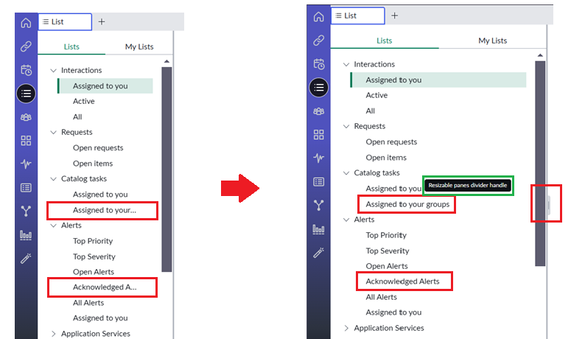
In this article we will see how can we increase the default width of the list divider on the Service Operations Workspace.
➡️ By default, in Service Operations Workspace the list view doesn't display the complete list headings and requires a manual adjustment using the resizable handler.

Now we will see how we can we bring the expanded section by default on accessing the list view of the workspace.
➡️ In UI Builder, navigate to the Service Operations Workspace experience and access the "List SNC" under pages and variant.
Note: The scope is "Service Operations Workspace Core" and its a read only page.

➡️ Change the scope and select apply. However the page is still not editable.

➡️ Access the client state parameter on the left pane and scroll to the "listDividerPosition" parameter.
Note : Default value is 260px.

➡️ Change the parameter value accordingly and save it.

Note: The divider can still be resized (increase or decrease) if required. By setting this value, it defaults to the mentioned input on accessing the list view.
Result :

Try to re-login or clear the cache incase it doesn't reflect the changes.
Kindly hit "Helpful" if it was helpful for your needs!!!!
ServiceNow #ServiceOperationsWorkspace #ServiceNowCommunity
https://www.servicenow.com/community/service-operations-workspace/service-operations-workspace-how-to-increase-the-default-width/ta-p/3176507