
Virtual Agent - Check IT Ticket Status for Incidents & Requests
 New article articles in ServiceNow Community
·
Feb 03, 2025
·
article
New article articles in ServiceNow Community
·
Feb 03, 2025
·
article
 Sujatha V M
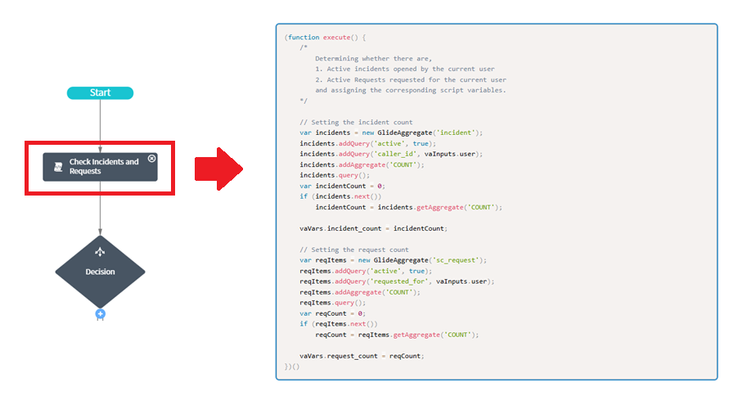
In this article we will see how to build a topic to display "Incidents" and "Requests" on the virtual agent.
1. Clone the OOB Check IT Ticket Status topic and deactivate it.
2. Replace the syntax of the script action utility "Check Incidents & Requests"

3. Replace the variable name (if required, to be in line with request) which captures the count.

4. Update the below decision parameters

5. Update the text response of the decision utility "Neither Incidents nor Requests"

6. Update the branches of decision utility "Has Records"

7. Update the "Prompt" and "Define Choices" script section of Dynamic choice input utility.

8. Update the "Before Card" text response, decision activity "Request" and the script on "Request Card" details.

RESULTS:

Kindly mark the article as "Helpful" if it has helped you.
ServiceNow #ServiceNowCommunity #VirtualAgent
https://www.servicenow.com/community/itsm-articles/virtual-agent-check-it-ticket-status-for-incidents-amp-requests/ta-p/3166346