
Enforce calendar use by making the date variable input read-only for catalog item in native & portal
 New article articles in ServiceNow Community
·
Jan 11, 2025
·
article
New article articles in ServiceNow Community
·
Jan 11, 2025
·
article
 Ankur Bawiskar
There is often a requirement to make a date variable input as read-only for a catalog item, allowing users to utilize the calendar feature instead of entering the date manually.
Here is the solution for this requirement:
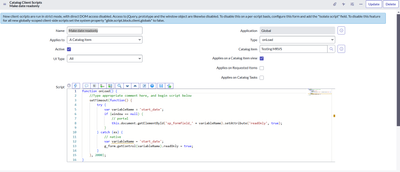
1) Create an onLoad catalog client script which applies to both UI type
2) Add script shared below
Script:
function onLoad() {
    //Type appropriate comment here, and begin script below
    setTimeout(function() {
        try {
            var variableName = 'start_date';
            if (window == null) {
                // portal
                this.document.getElementById('sp_formfield_' + variableName).setAttribute('readOnly', true);
            }
        } catch (ex) {
            // native
            var variableName = 'start_date';
            g_form.getControl(variableName).readOnly = true;
        }
    }, 2000);
}
Catalog client script configuration:

Output:

View original source
https://www.servicenow.com/community/service-operations-workspace/enforce-calendar-use-by-making-the-date-variable-input-read-only/ta-p/3146347