
Identify active flows running on particular table
 New article articles in ServiceNow Community
·
Jan 10, 2025
·
article
New article articles in ServiceNow Community
·
Jan 10, 2025
·
article
 Ankur Bawiskar
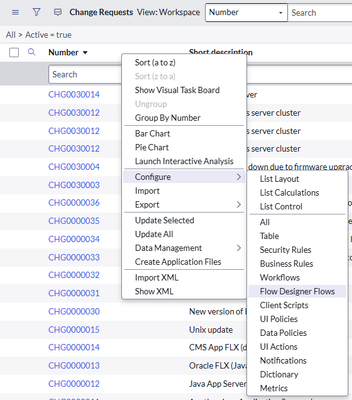
We often need to identify which flows are running on a particular table. Unfortunately, this cannot be determined out of the box in Flow Designer or Workflow Studio. However, there are two ways to achieve this:
1.Navigate to the table list, right-click any column header, and select Configure > Flow Designer Flows.

2. Use the following script in the background and pass the table name:
var flowName = []; var flowArray = sn_flow.AssociatedFlows.getFlows("change_request"); var flowRec = new GlideRecord('sys_hub_flow'); flowRec.addQuery('sys_id', 'IN', flowArray); flowRec.query(); while (flowRec.next()) { flowName.push(flowRec.getValue('name')); } gs.info('Flows associated with table are-: ' + flowName);
Output:

https://www.servicenow.com/community/service-operations-workspace/identify-active-flows-running-on-particular-table/ta-p/3146063