
Scoring in New CMDB Health Dashboard
 New article articles in ServiceNow Community
·
Oct 31, 2024
·
article
New article articles in ServiceNow Community
·
Oct 31, 2024
·
article
The CMDB Health Dashboard has been redesigned in Xanadu and moved to the CMDB Workspace, enabling ServiceNow to iterate more rapidly and improve the dashboard. In this article, I'll explain the new scoring system with an example dataset.
Key changes to the health dashboard include:
- Simplified scoring: The previous threshold settings for calculating KPI scores (completeness, correctness, compliance) have been removed. The KPI score is now calculated as the ratio of all failed CIs across sub-metrics to the total CIs across those sub-metrics.
- Failure limits: The maximum failures for each metric (e.g., Required, Recommended) are now capped at 100K, regardless of the failure threshold setting in Health Preferences.
Below is an overview of how scores are calculated for each KPI (Correctness, Completeness, Compliance).
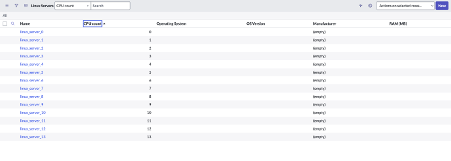
- I added 14 Linux server CIs to the
cmdb_citable, namedlinux_server_0tolinux_server_13, each with a corresponding CPU count from 0 to 13.
- I added a new orphan rule for Linux servers where cpu_count > 9 and ran the correctness job.
- As a result, 4 CIs failed the orphan rule, while 10 were healthy, resulting in a 71% (10/14) health score for the orphan KPI. For correctness: Across all three metrics, 4 out of 14 CIs failed, yielding the same 71% score.
- I then created 4 duplicate CIs,
linux_server_0tolinux_server_3, and ran the correctness job once more. Updated scores:


Duplicate: 8 failures for CIs ending in 0-3; score: 10 healthy out of 18 total, or 56%.
Orphan: 4 failures for CIs ending in 10-13; score: 14/18, or 78%.
Correctness: 12 total failures (8 from CIs ending in 0-3 and 4 from those ending in 10-13), resulting in a 33% score (6 healthy out of 18).

Health inclusion rules will also play a role in computing the total CIs for the KPI Metrics
https://www.servicenow.com/community/cmdb-articles/scoring-in-new-cmdb-health-dashboard/ta-p/3092895