
All things about time limited user role
Import
·
Aug 16, 2024
·
article
This article covers the feature that came out in Washington DC release first, this was a long standing ask from customers to have time limited user role assigned to users for a specific purpose. Some use cases (but not limited to below) are :
- If you want a person to be the admin for a certain duration to perform certain task while you are away or busy
- If you want to give read only access (snc_read_only) to the user to limit their actions on the table on which they already have access typically for audit purposes
- You want a user to impersonate for a certain time duration
Now the fine details around this functionality are below
- It only allows the following roles to be assigned
- Admin
- snc_read_only
- impersonate
This means it doesn’t allow any other role for any application that comes as part of baseline such as itil, hr related etc.
- Unlike ServiceNow suggested method of adding roles to groups, this method only allows adding roles to individual user.
- There is a system property that defines the maximum duration (in days) for which time limited roles are active, this system property is called ‘glide.security.timelimited.roles.allowed_max_days’. Default value is ‘5’ days. Note: Only uses with ‘Maint’ role can edit this property
- In the platform, roles are session-based. However, if roles are granted through the time-based roles feature, they may not persist for the entire session if the session extends beyond the end time specified in the time-based role record i.e. The roles are revoked as soon as mentioned end time on the time-based role record is reached
- If the user's "admin" role is part of the time-based role functionality, users with a time-based admin role have all the regular privileges of a permanent admin. One such privilege is the ability to edit their time-based role records. This is true when logging in as the user, but impersonation only gives read access to these records. Note that the admin user can extend the time limited user record for only 5 more days again by modifying the start and end dates on the record
- The time limited user records have ‘Active=true’ that remains true even after mentioned end time has passed. However, the roles will be revoked from the user.
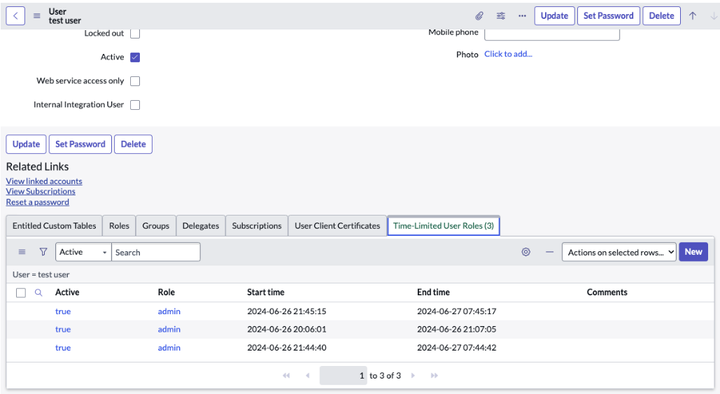
- Time limited roles assigned to user and history can be viewed in user record under 'time-limited user role 'related list. This related list is not available by default but can be configured using configure -> related lists on the user form. Similarly, 'time-limited user role 'related list can be added on role record.

Here is how the security access to "sys_user_has_time_limitied_role" table works
| Create Access: | Admin Also include time-limited admin role |
|---|---|
| Read Access: | 1. ITIL 2. user_admin 3. role_delegator |
| Delete Access: | Same as Create access |
| Report Access: | Admin |
Note: if you want to play around further , see what happens when you assign all the 3 time-limited role to the same user 
View original source
https://www.servicenow.com/community/architect-articles/all-things-about-time-limited-user-role/ta-p/3019745