
Need Dynamic Translation on Variables in forms? - check this
Last week I had a super interesting call with an international customer, where they needed to be able to allow their agents the ability to read submitted variables on their requests to aid fulfilment. Which makes perfect sense, because we have the ability ootb for fields (such as string and html type fields). However, we don't (yet) have the ability on variables. Let's change that right now! Grab your favourite beverage of choice (I have my coffee in hand) because we're going to delve into the world of GlideAJAX, API's, lesser known methods and let's do this!
The ideal
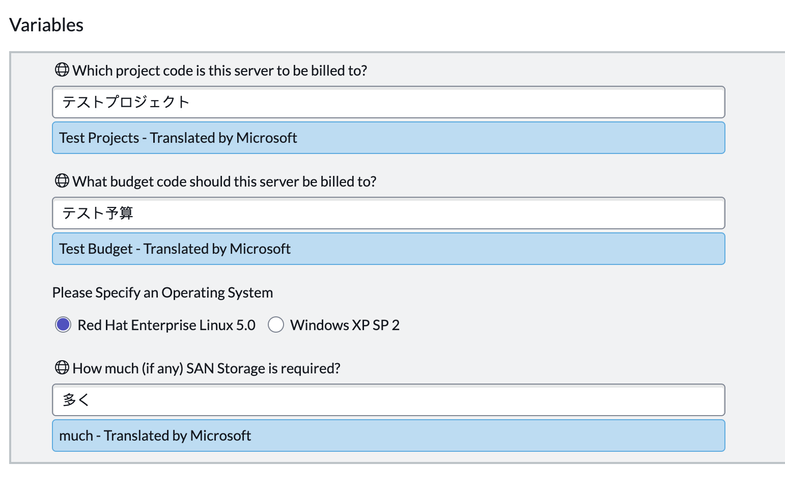
Imagine, you have a RITM, which has a few variables and they are in a language you can't read. This is a genuine issue in some teams. Now, imagine if we could show that user the text in their language like this:

Above you can see that we can apply Dyanmic Translation specifically to the "string" type (free text) variables on the form, however there's a bit of a but. It's not ootb so we need to think how we do it.
To do this, there are a few pre-reqs:
- You need to have Dynamic Translation installed and set (because we need it's API's)
- You need to have the Localization Framework installed because we need one of it's Script Includes (SI's).
The Design
As you can see in the screenshot, it's clearly taken from the "CoreUI" / "UI16", this is because for this specific use-case for this Customer, this is the UI I was focussing on first with this solution. We will look to try and make it work for Workspaces as well in the future, unless it becomes part of the ootb offering (yes there are a few IDEAs already logged on this topic) but as that day is not today we have this.
So, what-ever we were to do, we have to ensure we are not causing any customizations to anything ootb (just incase it does become part of the ootb offering), and we also need to ensure we're not doing any DOM manipulation. This therefore meant that I couldn't go hacking up the "Variable Editor" formatter and stretch my knowledge of "Jelly" that little bit more. Instead we need to think how we can "trigger" the behaviour we want coupled with how we "show" the output we want.
I started to think about a flag field and potentially a Display Business Rule potentially sending a big scratchpad, but then I thought about something even simpler. I could use an onLoad Client Script to read the values I want because this allows me access to "g_form" and "g_sc_form" to give me access to decorations and super importantly "showFieldMsg", this also allows me the ability to keep the heavy lifting part on the server by leverage a GlideAJAX call.
I*mportant note* > You do not need to use a Client Script for the client side, you could just as easily convert it into a UI action so it's only callable to whom you want and when you want. I'm using a Client Script in this example just to show the concept. And this
is important because in this design it will trigger DT upon each form load.
The Solution
Amazingly, all we need is 1 Client-Script and 1 Script-Include to do this. I'll break down each one and what it does;
The Client-Script
We need to declare a Client-Script on the [sc_req_item] table (this is the task type table that holds RITM's and typically has variables.
Side note - the variable's values for RITM's are stored in the [sc_item_option_new] table, for everything else (e.g. if you wanted this behaviour for a Record Producer for HR cases, or Incidents) you would need to change the logic in the Script Include to point to the [question_answer] table. In principle it works exactly the same but double check your query to this table to make sure you're
point to the right fields.

Make sure that your client-script is in the "global" scope.
Code:
function onLoad() {
    try {
        // decorate the appropriate variables
        var getVars = g_sc_form.elements;

        var varJSON = JSON.stringify(getVars);
        // now we need to find the variables we care about
        var varName = '';
        var getVarStr = JSON.parse(varJSON, function(key, value) {

            if (value.toString().includes('ni.')) {
                varName = value.toString();
            }
            if (key == 'type' && value == 'string' && varName != '') {
                // we need to parse the field label of the variable
                g_sc_form.addDecoration(varName, "icon-global");
            }
        });

        // now we need to get the text for translation
        var theVars = g_sc_form.getEditableFields();
        var theVarsArr = theVars.toString().split(',');
        for (var v1 = 0; v1 < theVarsArr.length; v1++) {
            var varVal = theVarsArr[v1].toString();
            var varValue = g_sc_form.getValue(varVal);
            if (varValue.toString() != 'true' && varValue.toString() != 'false') {
                // now we need to call a custom GlideAJAX to fetch the translations
                var callTrans = new GlideAjax('poc_var_trans');
                callTrans.addParam('sysparm_name', 'getTranslation');
                callTrans.addParam('sysparm_string', varValue.toString());
                callTrans.addParam('sysparm_variable', theVarsArr[v1].toString());
                callTrans.addParam('sysparm_task', g_form.getUniqueValue().toString());
                callTrans.getXML(translationParse);
            }
        }
    } catch (err) {
        alert('Error in poc_DT_variables_onLoad - ' + err + ' - ' + err.message);
    }
}

function translationParse(response) {
    try {
        var output = '';
        var valResponse = response.responseXML.getElementsByTagName("result");
        for (var i = 0; i < valResponse.length; i++) {
            var name = valResponse[i].getAttribute("variable");
            var value = valResponse[i].getAttribute("value");
            //output += name + " = " + value + "\n ";
            if(name != 'null' || name != null){
                g_sc_form.showFieldMsg(name, value);
            }
        }
    } catch (err) {
        alert('Error in translationParse - ' + err.name + ' - ' + err.message);
    }
}
It's not very widely known, but whilst everyone knows about "g_form", there's another call you can use called "g_sc_form" (Glide Service-Catalog Form), which has it's own methods. In this case, we're going to be leveraging "getEditableFields()" which you'll find give us only the variable ID's which is exactly what we need because we can then send those ID's much like field names into "getValue()". We can even use those same values with "showFieldMsg()" which are treated exactly the same as any other field.
The Script-Include
With the Script-Include, we need to make sure it's available to all scopes and that it's "Client Callable" because we're calling it from a GlideAJAX call in our client-script:

Code:
var poc_var_trans = Class.create();
poc_var_trans.prototype = Object.extendsObject(AbstractAjaxProcessor, {

    getTranslation: function() {
        try {
            var result = this.newItem("result");
            var theVar = this.getParameter('sysparm_variable'); // variable ID
            var string = this.getParameter('sysparm_string'); // the string to translate
            var taskSys = this.getParameter('sysparm_task'); // task record for gr'ing to get the text
            string = string.toString();
            // we need to include a few other scripts
            gs.include('LFTranslateUtils'); // this is mandatory

            // we need to know which translator is used for DT
            var usedTranslator = '';
            var getTranslator = new GlideRecord('sn_dt_translator_configuration');
            getTranslator.addEncodedQuery('default_provider=true');
            getTranslator.query();
            if (getTranslator.next()) {
                usedTranslator = getTranslator.name.toString();
            }

            var getString = new GlideRecord('sc_item_option_mtom');
            getString.addEncodedQuery('request_item.sys_id=' + taskSys + '^sc_item_option.value=' + string);
            getString.query();
            if (getString.next()) {
                var detectedResponse = sn_dt_api.DynamicTranslation.getDetectedLanguage(getString.sc_item_option.value.toString());
                var respStr = JSON.stringify(detectedResponse);
                var respE = new JSON().decode(respStr);
                var strLang = respE.detectedLanguage.name.toString();
                if (strLang != gs.getSession().getLanguage()) {
                    var getTranslation = JSON.stringify(sn_dt_api.DynamicTranslation.getTranslation(getString.sc_item_option.value.toString()), {
                        "targetLanguages": gs.getSession().getLanguage(),
                        "additionalParameters": [{
                            "parameterName": "texttype",
                            "parameterValue": "plain"
                        }],
                        "translator": usedTranslator
                    });
                    var gTransObj = JSON.parse(getTranslation, function(key, value) {
                        if (key == 'translatedText') {
                            result.setAttribute("value", value.toString()+ gs.getMessage(" - Translated by ")+usedTranslator.toString());
                            result.setAttribute("variable", theVar.toString());
                            return result;
                        }
                    });
                }
            }
        } catch (err) {
            gs.log('Error in poc_var_trans.getTranslation - ' + err.name + ' - ' + err.message);
        }
    },
    type: 'poc_var_trans'
});
So in our query, we need to know what the string we want to translate is, the variable ID so when we send it back we can super easily mapping the string to the variable in our response function, and the task's sys_id so that we can easily query the variable table. We also need to ensure that we check that Dynamic Translation is configured so we know which MT to use, and we also need to ensure we are translating to the user's language. This therefore means that our query is entirely dynamic, because we want to avoid any hard-coded elements to ensure the most amount of users can benefit from it.
Summary
What have we learned? Well, If we think a little bit out of the box, we can absolutely (and fairly easily) make a solution that can scale (for multiple scenarios) leverage various building blocks provided to use. In this case we leveraged Client-Scripts, Script-Includes, Decorators, DynamicTranslation, LocalizationFramework, multiple API's, and multiple Methods in such a way that if this becomes a feature ootb in the future we can easily deactivate these two scripts without impacting possible future capabilities as we're not changing anything ootb.
If you found this helpful, please like, share and subscribe as it always helps.

https://www.servicenow.com/community/international-localization/need-dynamic-translation-on-variables-in-forms-check-this/ta-p/2850276