
Good technical tips from the popular Linkdlin 2023 ServiceNow posts
This blog have collected 50 most popular ServiceNow technical posts from linkedin, which can help our Community members for their ServiceNow projects and works.
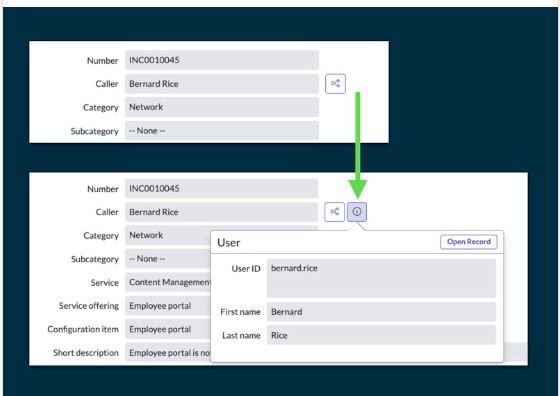
When dealing with read-only reference fields, users often wonder why the reference pop-up (the ℹ icon next to the field) is not there. As a result, it becomes a common requirement to add it back.
Reference pop-ups are hidden by default when a reference field is set to read-only by client scripts, UI policies, or ACLs. This is controlled by the glide.ui.reference.readonly.clickthrough system property.
How can we add it back?
Option 1: Change the value of the system property to true to enable it system wide.
Option 2: Giving you more control, you can enable it for individual fields by adding the readonly_clickthrough=true attribute to the dictionary entry. This only works if the value of the system property is set to false.

2. https://www.linkedin.com/posts/maik-skoddow%5Fservicenow-activity-7059452055496634368-2r6u


4. https://www.linkedin.com/feed/update/urn:li:activity:7103784710132158464/


10. https://www.linkedin.com/feed/update/urn:li:activity:6988184667225034752/


11. https://www.linkedin.com/feed/update/urn:li:activity:7108629026226737154/

12. https://www.linkedin.com/posts/maik-skoddow%5Fservicenow-activity-7057286547796045824-VuQd


15. https://www.linkedin.com/posts/maik-skoddow%5Fservicenow-activity-7127927782214393856-uIkk/


17. https://www.linkedin.com/feed/update/urn:li:activity:7099541296242982914/

18. https://www.linkedin.com/posts/maik-skoddow%5Fservicenow-activity-7113350923715784705-W71n/


20. https://www.linkedin.com/posts/maik-skoddow_servicenow-activity-7095615263806496768--jLU/

21. https://www.linkedin.com/posts/maik-skoddow_servicenow-activity-7052183963301220352-9mBK


24. https://www.linkedin.com/posts/maik-skoddow%5Fservicenow-activity-7094905597615112192-bCQ9


27. https://www.linkedin.com/feed/update/urn:li:activity:7091597158763679744

28. https://www.linkedin.com/posts/maik-skoddow%5Fservicenow-activity-7085956057159618560-LwHl

29. https://www.linkedin.com/feed/update/urn:li:activity:7085772807279710208

30. https://www.linkedin.com/posts/maik-skoddow%5Fservicenow-activity-7067817599958437888-ierK

31. https://www.linkedin.com/feed/update/urn:li:activity:7078900374350286848


33. https://www.linkedin.com/posts/maik-skoddow%5Fservicenow-activity-7065693466046918657-DEIO

34. https://www.linkedin.com/posts/maik-skoddow%5Fservicenow-activity-7040958407956185088-y3Tn

35. https://www.linkedin.com/posts/maik-skoddow%5Fservicenow-activity-7025349902310211584-lcWU


38. https://www.linkedin.com/feed/update/urn:li:activity:7099348581974712321/

39. https://www.linkedin.com/feed/update/urn:li:activity:7105576963561447424/


41. https://www.linkedin.com/posts/daniel-c-b90529153%5Fservicenow-activity-7130795634328010754--sL5/


46. https://www.linkedin.com/posts/maik-skoddow%5Fservicenow-activity-7139868465737150465-iL9h/
Skipped records are a major annoyance in #ServiceNow. And I am not referring to skipped records for changed OOTB artifacts, but those that arise after the deployment of custom applications via the application repository. If the processing of skipped records does not become an integral part of your deployment process, you run the risk of your instances deviating more and more from each other unnoticed and thus a flood of bug tickets is guaranteed. For this reason, I created a Business Rule that performs a lookup at table "sys_upgrade_history_log" when an artifact record is opened to see whether there is currently a skipped record for it and generates a corresponding warning message accordingly if this applies. You can find that Business Rule as the latest entry on my page "My collected list of useful Business Rules": https://lnkd.in/euyCtVCx

47. https://www.linkedin.com/feed/update/urn:li:activity:7139671586436956160/
SN Utils is a powerful Chrome extension that provides a suite of tools to enhance your experience with ServiceNow with the following features:
- Search tables and open list, dictionary or schema map.
- Slashcommands type in /help to know more about this feature
- Edit scripts and widgets in VS Code! (requires sn-scriptsync)
- Show technical names: Show useful info like choice value and name next
to labels.
- Search updatesets in progress, view list and set current.
- View your last 20 updates, browse to related record. (Admin role only) -
Node switching.
- View the data and columns of the current record in a table (similair to
view XML)
- Select a (abstract) username, view details of user. - Provide (context aware)
links to relevant places.
- Ability to popin, popout, or copy a tab. (also via context menu)
- Generate GlideRecord template, based on list
- Save record with CTRL-S / CMD-S - Rightclick to go to Scriptinclude, table
or search
- Paste a clipboard image to any record with CTRL
-V / CMD-V - CMD / CTRL Click in a form on element labels, to build
conditions and open list - Support for Studio
- Context menu code snippets and links
You can easily to configurate UN Utils tool into your Chrome following the following flow diagram.
https://www.servicenow.com/community/in-other-news/good-technical-tips-from-the-popular-linkdlin-2023-servicenow/ba-p/2736737