
Service Operations Workspace - How to configure “List Applicability”?
 New article articles in ServiceNow Community
·
Dec 15, 2024
·
article
New article articles in ServiceNow Community
·
Dec 15, 2024
·
article
 Sujatha V M
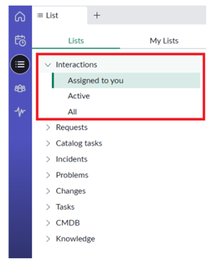
In this article, we will see how to configure "List Applicability" on service operation workspace lists.
By doing this, you can achieve hiding a specific list for a user, group, roles, companies, location or department or use scripting as well.
➡️ Navigate to the lists on the workspace and click on the list to be configured.
For e.g. Interactions

➡️ Click on the profile icon on the right top corner and select “List Applicabilities”

➡️ Based on the list selected, out-of-the-box list applicabilities are available.
For Interactions,

For Incidents,

➡️ Open the respective applicability record and add roles or user criteria inclusions or exclusions.

Note: Make sure to re-visit the existing list applicability records before creation of similar ones.
Kindly mark this article as "Helpful" if this resolves your query.
Servicenow #ServiceOperationsWorkspace#ServiceNowCommunity
https://www.servicenow.com/community/service-operations-workspace/service-operations-workspace-how-to-configure-list-applicability/ta-p/3127938