
Your input matters: Using feedback features to improve documentation
 New article articles in ServiceNow Community
·
Oct 28, 2024
·
article
New article articles in ServiceNow Community
·
Oct 28, 2024
·
article
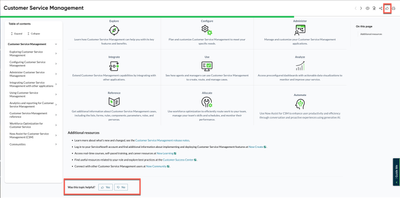
Did you know that you can provide direct feedback on any topic in our ServiceNow product documentation?
This functionality helps us understand how useful you find our content and identify areas for improvement. Your input—whether it's a positive note or constructive suggestion—guides us in creating more helpful documentation. It’s a simple way to make sure the content meets your needs.

How you can share feedback:
At the top of every documentation page, you’ll see a thumbs-up icon labeled Feedback. Using this form, you can rate the content, leave comments or suggestions, and, if you’d like, provide your email for a follow-up. When you’re done, just hit Send Feedback to submit.

You’ll also find another feedback option at the bottom of each page, where we ask, "Was this topic helpful?" If you click Yes, a quick form opens for any extra comments. If you click No, the form will include a checklist to help pinpoint what could be improved—like missing details or a need for more examples. You can also leave comments or add your email if you’d like to hear back from us. Including your email is especially helpful when your feedback is unclear, as it allows us to reach out for clarification and ensure we fully understand your input. Once you’ve shared your thoughts, just select Send Feedback.

It’s that simple! Every piece of feedback, positive or constructive, is valuable in making our documentation more effective and user-friendly. So, if you find something that could be better or especially helpful, don’t hesitate to let us know. Together, we can build documentation that works for you.
https://www.servicenow.com/community/csm-articles/your-input-matters-using-feedback-features-to-improve/ta-p/3086707