
New Data Model in CMDB for APIs
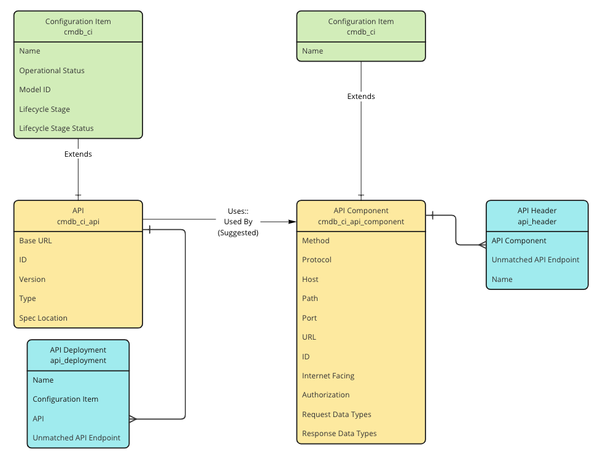
As of the 1.49 version (released September 2023) of the CMDB CI Models app on the ServiceNow store, there is a new data model for collecting API inventory and related information. While there are many different types of APIs (REST, SOAP, gRPC, etc) and many technologies supporting APIs (gateways, meshes, observability, CASB, etc), this new data model in CMDB is meant to be a normalized view across these various types and technologies.
Of the 10 new CI classes (and 6 related non-CMDB tables), some customers may find it sufficient to populate just a single table, while other integrations may target 9 or more of the tables. The point is that the model is designed to be flexible based on an organization’s data sources for such inventory. This article is intended to describe the data model in smaller segments and supplement the official ServiceNow documentation.
These are the new CI classes:
- API (cmdb_ci_api)
- API Component (cmdb_ci_api_component)
- API Frontend (cmdb_ci_api_frontend)
- API Backend (cmdb_ci_api_backend)
- API Gateway (cmdb_ci_api_gateway)
- Managed API (cmdb_ci_managed_api)
- Kong Gateway (cmdb_ci_kong_gateway)
- Kong Load Balancer (cmdb_ci_kong_lb)
- Kong Target (cmdb_ci_kong_target)
- Unmatched API Endpoint (cmdb_ci_unmatched_api_endpoint)
These are the new non-CMDB related tables:
- API Consumer (api_consumer)
- API Policy (api_policy)
- API Deployment (api_deployment)
- API Header (api_header)
- Kong Workspace (kong_workspace)
- API Endpoint Discovered (api_endpoint_discovered)
The Core Data Model
Let's start by looking at the first 2 new CI classes, API and API Component.

Core of the new API data model
The API class (cmdb_ci_api) is designed to store information about the top-level API like the name, version, and base URL. The API Component (cmdb_ci_api_component) is designed to represent the various resources of the API. These will include unique method and path combinations, varying authentication requirements, ports used, and more. Both of these classes are independent, but the ideal state would have the API Components be related to an API with the “Uses::Used By” relationship.
The API Deployment related item is meant to represent where an API is “running”. The basic information is just a “Name”, but if an existing configuration item can be identified, then the “Configuration Item” attribute may be manually populated as it is a reference to the cmdb_ci base class. An API can, for example, be deployed to multiple servers or possibly to SaaS-based serverless services. APIs are also commonly deployed within a set of containers running in a Kubernetes cluster.
The API Header related item for components is meant to capture a header schema. The “Name” attribute will store a header key, like “Authorization” or “Content-Type”.
An example of how this might look can come directly from ServiceNow if we look at the REST API Explorer.

ServiceNow Example
In this example, we are looking at the CMDB Instance API which would presumably be stored in the base API class (cmdb_ci_api). The various resources below that like "GET Query records for a CMDB class" would represent the different API components (cmdb_ci_api_component) related to the API.
Expanding the Data Model to API Gateways
API gateways have very structured representations of APIs and their components and are an ideal source of API inventory data. In addition to the two new classes described above, there are a number of classes surrounding these two which are used when populating from API Gateway sources. Expanding on the core model, we continue to build out the data model as follows:

Expanded data model for API Gateway data
A couple of initial points to notice are that the API class now has a new child class named "Managed API" (cmdb_ci_managed_api). This class has a dependency on the API Gateway class which the parent API class does not have.
Likewise, the API Component class has two new child classes, API Frontend (cmdb_ci_api_frontend) and API Backend (cmdb_ci_api_backend). These two new child classes are used to store common components found in API Gateways which represent the client facing frontend (request) endpoint and the request fulfilling backend service which provides the response.
We can look at an example of this using the Azure API Management service.

Azure API Management Service example
While the table "cmdb_ci_azure_gateway" does not currently exist, hopefully you can extrapolate how this will look in the future with that being a child class of the API Gateway class introduced in this new data model. In the picture of the Azure API Management service, you can see a number of APIs. When choosing the "Echo API" we see what Azure calls the various operations of the API. These are what we will normalize into the data model as API Components. However, we will not store them in that parent class, but use the additional data of this gateway to populate the API Frontend class with the "frontend" values like "POST /resource" and the API Backend class with the "backend" values like "http://echoapi.cloudapp.net/api" and related data about that resource.
We do not plan to replicate everything in the gateway into the ServiceNow CMDB, but rather, our intent is to capture the relevant data for achieving outcomes in the following use cases.
Example Data
Below is an example of how a gateway would populate the managed API dependent class which is a first level relationship to the gateway (denoted by the “L1”). You can also see the Frontend and Backend components below which map to the respective managed API and are second level relationships to the gateway (denoted by the “L2).

Kong Gateway Example
Below is a dependency view of the same gateway with related APIs and components.

Example dependency view
From this point, alerts can be bound to these CI's, dynamic CI groups can be created for service views, incidents and changes can be created against the CIs, vulnerable items can be filed, and any other workflow you have that uses CIs.
Data Model for Unstructured Data Sources
There are a couple of tables we have not touched on yet, which are “Unmatched API Endpoint” and the “API Endpoint Discovered”. These tables (1 is a CI class and 1 is meant to serve as more of a staging table) are used for use cases where the API data is very unstructured and needs to be processed beyond the normal means available in IntegrationHub-ETL.
The reason for creating this extra class for what is effectively the same as the API component class is that certain products in ServiceNow require a CI (like vulnerability management), but the data does not come into the system in a way where it can have standard identification rules applied. For the sake of data quality while still facilitating workflows like vulnerability management, it was necessary to introduce this unmatched class as a place where CIs could be created but have offline analytics run to further cleanse and possibly migrate the data to the API component class if possible.

Unstructured API Tables along with API and component
Let’s take a quick example of various types of data and how this may be handled.
Example 1: GET https://host/api/users/v1/{id}
Example 2: GET https://host/api/users/v2/{id}
Example 3: GET https://host/users/john/company/123/
Example 4: GET https://host/users/jane/company/345/
Example 5: GET https://host/users/{alpha}/company/{int}
Handling this data will be dependent upon how an integration is built, by either ServiceNow, a partner, or a customer. However, we can look more closely at the first 2 examples and possibly use logic that says to parse up to a “/v[numeric]” which would result in us know there is a “users” API with 2 versions and a path expecting an “{id}”. If this was the only data coming, then we could create 2 API records (cmdb_ci_api), one for each version, and a single corresponding API component for the GET method.
The last 3 examples are where the unstructured process and tables comes in. Examples 3 and 4 are effectively the same API component request, but they have different query parameters encoded into the URL. There is no way to programmatically know how to parse this URL and make it generic enough like other similarly structured records (or unstructured) that might have more or less query parameters in the URL string. These records would end up in the “Unmatched API Endpoint” class.
Sometime later the source system recognized the pattern and makes it a more general entry when seeing this traffic. This results in Example 5 coming into the system, which represents the same endpoint as Examples 3 and 4, but now is made more generic. Without going into the ways this could be evaluated for proper structure, we can assume that it would meet the quality checks necessary and store this record in the API Component class while also marking the records in “Unmatched API Endpoint” for Examples 3 and 4 as “Absent” or “Non-operational” or some other way that disqualifies them from operational use.
The staging table (it’s not an import set row table) is there to serve as a place to store the raw data and then perform processing as described above.
Flexibility in the Model
As you have hopefully gathered from this article, API related data comes in many forms. The goal of this data model in CMDB is to provide customers the flexibility to capture what’s important to facilitate their workflows and based on what data sources they have available with such information. The intent from ServiceNow is to continue to build out the data model as we create out of the box integrations to help customers populate the data model and keep it up to date automatically. This is just the beginning!
https://www.servicenow.com/community/cmdb-articles/new-data-model-in-cmdb-for-apis/ta-p/2688843