
Options for Importing External Articles into ServiceNow Knowledge Management
 Ashley Snyder
ServiceNow Knowledge Management allows you to import your existing knowledge articles. This document is intended to assist knowledge administrators in successfully importing knowing articles. It captures a step-by-step guide, different import options, and import recommendations.
Every organization has a different knowledge base structure. Depending on your industry, you may need to bring all your content over to a new knowledge base, or you may be able to leave outdated or irrelevant articles behind. It is essential that you consider your company’s needs and plan for your knowledge base import. Consider the recommendations below before importing knowledge articles.
Key Recommendations:
- Review your knowledge articles and remove obsolete, unused content that is no longer relevant.
- Identify and define knowledge article categories ahead of time. Your categories should be structured for findability on ServiceNow.
- Tagging imported knowledge articles for future identification purposes is a good idea.
- Determine the size and volume of the knowledge base, such as the number of articles, media images, etc.
- You can plan for knowledge migration in multiple phases depending on the size. Focus on high-value content that is heavily consumed and utilized. Plan for appropriate resources, time, and effort for every phase.
- Evaluate the below-suggested import options by considering the size, volume, and type of knowledge base that is the import source.
Import Methods:
- Manual import (Low number of articles)
- Easy import (Bulk articles)
- API (Large batches of bulk articles)
- Technology Partners & ServiceNow Partner Program
Manual Import
ServiceNow Knowledge Management lets you manually import your existing knowledge articles using the Import Articles functionality. This option is better suited to importing a lower number of articles. Manual import offers a guided import wizard to import multiple documents simultaneously. When you import a document, text content from the document is used to create the knowledge article(s). Images from the document are added as attachments to the knowledge article and embedded in the article body.
Setup
Before you begin, consider the below setup options related to knowledge import. See the product documentation for any configuration needed for upgrade customers to use this functionality.
Procedure
- Navigate to the All menu > Knowledge > Import Articles module.
- Select an appropriate knowledge base from the list.
- Organize your knowledge articles by category and import the articles by category. You can upload one or more articles at a time during import.
- Click the Import button.

Key Considerations
- The Import wizard only supports Microsoft Word documents - .docx files. Convert all knowledge articles to the Microsoft Word format before import.
- Images from the document are added as attachments to the knowledge article and embedded in the article body. This will be counted against instance disk space.
- The manual import approach is best suited to a low number of knowledge articles and it’s recommended to upload knowledge articles in small batches.
Easy Import
Knowledge articles can be imported using ServiceNow's standard template-based functionality called Easy import. This approach is good if you have sizable articles that must be imported in bulk.
Procedure
- Navigate to Knowledge > Articles > All. Right-click on the list header and select Import.
- Click the Create Excel Template button to generate an import template.
- Download and fill in the template. The template ships with a Quick Start Guide on the first worksheet tab. Capture all HTML text under the column Text.
- Upload the template file and click the Upload button. Upon completion, a pop-up window appears with a success message. Click on the Preview Imported Data button to review the imported articles.
- Review imported article rows for data accuracy and click on the Complete Import button at the bottom of the rows to finalize the import process.
- Upon completion, you should be able to see all recently imported articles.


Key Considerations
- This approach is better suited for sizable knowledge articles without embedded media content.
- Images from the document are added as attachments to the knowledge article and embedded in the article body. This will be counted against instance disk space.
- Importing knowledge articles in small batches is essential to avoid request timeout.
- Always validate imported articles before finalizing import.
- Be aware of Microsoft Excel limits during template population.
- If a complex scenario requires additional transformations and custom validations before import, consider Import Sets. Import Sets is a powerful tool used to import data from various data sources and map the data into ServiceNow tables.
API
ServiceNow integrations with many third-party applications and data sources. Various techniques can be used, most notably Web Services, JDBC, LDAP, Excel, CSV, email, and any industry standard technologies that use REST, SOAP, or WSDL. ServiceNow supports knowledge article import using REST API. This approach is good if you have a large number of articles that need to be imported in an automated fashion.
API to Import Knowledge Articles
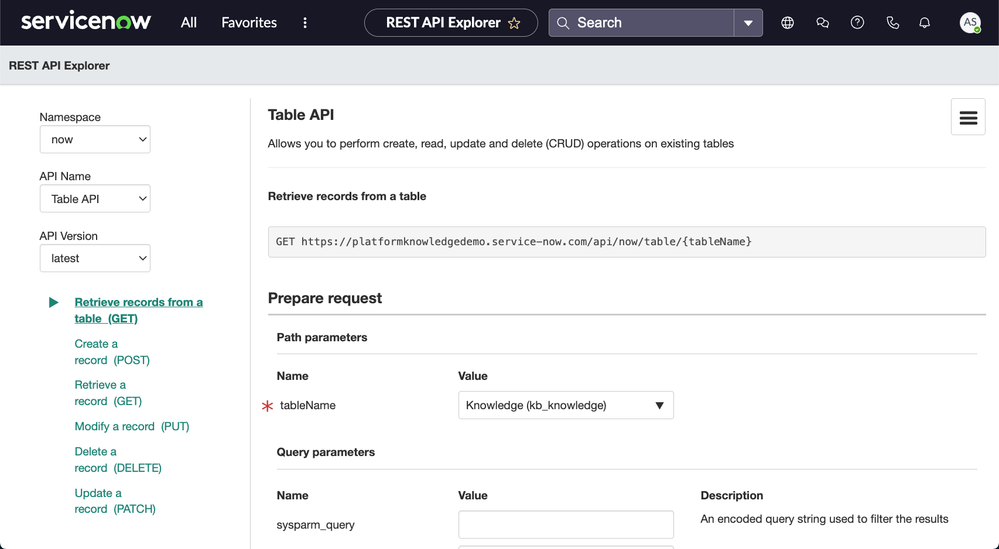
Use the ServiceNow Table API to create, read, update, and delete (CRUD) operations on the existing knowledge base table (kb_knowledge). REST API Explorer is a good starting point which provides a list of endpoints, methods, and variables that you can use to build and send a REST request. After you build the request, the REST API Explorer provides code samples in multiple programming languages that you can use to send the request and detailed request and response information.

Key Considerations
- It is advisable to use REST API as it supports multi-threading, many scripting languages, and unlimited attachment size.
- If you have a requirement to attach images to knowledge articles, then review the product documentation of the Attachment API. The Attachment API allows you to upload and query file attachments.
- You may need to configure the maximum transaction time to upload or retrieve large attachments using the Attachment API. Depending on the attachment size and network speed, uploading or retrieving large attachments may take a long time. By default, if a transaction takes longer than 60 seconds, that transaction is canceled, and the error Transaction called: maximum execution time exceeded appears. An administrator can set the maximum duration value of the REST Attachment API request timeout transaction quota.
- The system property com.glide.attachment.max_size sets the maximum file attachment size in megabytes. Before uploading, identify the maximum attachment size and configure this parameter value accordingly. Uploaded attachments will be counted against instance disk space.
- To improve cycle time, submit the upload process/program concurrently. The upload process/program can be multithreaded inside the script or just by running multiple instances of the upload script in the OS.
- Before designing the upload programs, finalize the environment details such as OS, file system, scripting language, and libraries.
- Identify any post-upload data manipulation that may be needed after successfully attaching to each record.
Technology Partners
ServiceNow has a rich ecosystem of partner solutions. Many Technology Partners have built hundreds of applications on the ServiceNow platform –created for specific industries and functional areas. The ServiceNow Store is a diverse, innovative enterprise application marketplace with many solutions. The apps in the ServiceNow Store are certified so that you can be assured of good performance, security, and compatibility.
ServiceNow Partner Program
If you need assistance with your Knowledge Management implementation or importing external articles into ServiceNow, the Partner Program can assist you in finding the right ServiceNow partner for your needs. Use the Partner Finder to describe your needs to be paired with the partner who can best help.
https://www.servicenow.com/community/knowledge-management-articles/options-for-importing-external-articles-into-servicenow/ta-p/2673388