
How to build ServiceNow user interface (Virtual Agent) on the portal to chat with Chat GPT
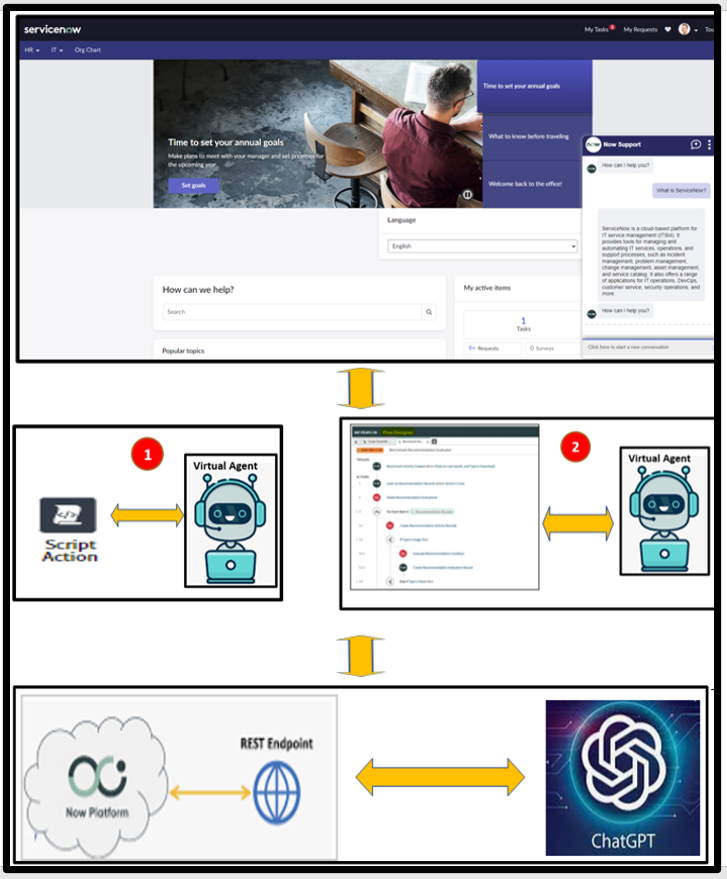
The purpose of this blog is to show how to build the ChatGPT interface on ServiceNow Employee Center portal so the end user can directly chat with the ChatGPT from ServiceNow portal without going to the ChatGPT site.
Use Case: a user can ask any question in real time through ServiceNow ChatGPT portal interface and then ChatGPT shall provide its answer in real time.
High Level Design

Technical Approach 1 (See above design)
- Create outbound REST integration with ChatGPT
- Create the Virtual Agent flow with the Action script to perform REST integration
- Configure the Virtual Agent in Employee Center Pro (ECP)
Technical Approach 2 (See above design)
- Create outbound REST integration with ChatGPT
- Create the Flow Action to perform REST integration in Action Designer
- Create the Virtual Agent flow to call the Flow Action
- Configure the Virtual Agent in Employee Center Pro (ECP)
Approach one Implementation Steps
Create REST message record by ChatGPT endpoint

Create POST REST method variables

HTTP configuration

- Create the Virtual Agent Flow with the action script
Step 1 - create user input with the script for user prompt

Step 2 - create the action script to perform REST *integration

Step 3 - create the response to hold ChatGPT's answer

Approach two Implementation Steps
- Collecting ChatGPT REST integration required information - Repeat step 1 in Approach one
- Create ServiceNow outbound REST message - Repeat step 1 in Approach one.
- Create the Flow Action to call REST message in Action Designer -you need to complete 4 steps blow

- Create the Action in Virtual Agent to configure the Flow action created above steps

- Configure the Virtual Agent in Employee Center Pro (ECP)
- Demo


Summary
An end user can access ChatGPT from ServiceNow virtual agent on Employee Center Pro (ECP) in real time to ask any question and get its answer. ServiceNow REST integration; Flow designer, Virtual agent and User interface of ESP are ServiceNow features are used for this use case.
References:
Please mark my blog helpful if you lean something form this blog.
https://www.servicenow.com/community/in-other-news/how-to-build-servicenow-user-interface-virtual-agent-on-the/ba-p/2659063