
Getting Started with Admin Center
 Ashley Snyder
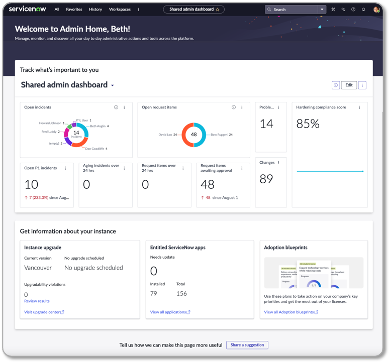
Admin Center provides a central hub for platform owners and admins to access platform capabilities, discover new applications and features with recommended solutions to achieve business goals, manage and track daily administrative work, and stay on top of high-priority incidents or tasks.
Currently, there are two capabilities found within Admin Center:
- Admin Home
- Adoption Blueprints

With the Admin Home page, you can manage and track your daily tasks easily via the out-of-the-box dashboard. You can configure this dashboard for all of your admins, or create your own.
For more information on how to configure Next Experience dashboards, see the platform analytics workspace product documentation on in-line dashboard editing.
The Admin Home page also shows instance-specific information, such as which version the instance is on, upgrades scheduled, and applications that have updates available.

Adoption Blueprints showcase the applications and features at your disposal, along with recommended solutions to help you achieve your business goals. With Adoption Blueprints, admins are provided with a guided experience to effectively implement features that align with their overall business objectives. Each objective is accompanied by a maturity journey track, which outlines the steps needed to progress:
- Build a foundation (Crawl)
- Enhance the experience (Walk)
- Optimize the functionality (Run)
- Add advanced features (Fly)
Each maturity journey track builds on the previous one, helping you expand and scale your approach. The suggested sequence is a starting point, and you can decide in which order you would like to complete tracks. Clicking into an application from Adoption Blueprints shows more information about the application, and admins can choose to install the application from the application details page.
Users with the admin role have access to the Admin Home page and Adoption Blueprints. As of the Vancouver release, admins can share Adoption Blueprints to other users in a read-only mode.
 Step 1: Documentation Step 1: Documentation |
 Step 2: Training Step 2: Training |
 Step 3: Best Practices Step 3: Best Practices |
 Step 4: Further Resources Step 4: Further Resources |
|---|
CreatorCon is a special program of sessions and training that runs every year during our Knowledge conference. Every year, we get access to new great presentations and courses about our Now Platform Products.
Whether you're new to ServiceNow System Administration or looking to find out the latest information and best practices, we have resources to help you understand how to use Admin Experience features effectively.
The Platform Academy is a series of live sessions focused on platform topics. The academy occurs every other week on Thursday (9 am PST). There will be product experts on hand to demonstrate concepts, best practices, provide guidance, and answer questions in a live setting.
You must register to receive an invite, and you can register for the entire series at one time.
In addition to PDIs and courses, the developer program publishes blogs, podcasts, and videos about our Admin Experience products.
Article: Intro to Admin Center, a part of ServiceNow Impact
Our greatest asset is YOU. Our ServiceNow community has a wide array of amazing ServiceNow developers, practitioners, admins, and content creators. Thank you!
(Author: Maik Skoddow, Release: Tokyo)

https://www.servicenow.com/community/admin-experience-articles/getting-started-with-admin-center/ta-p/2638788