
Vancouver: Security Attribute Conditions Explained
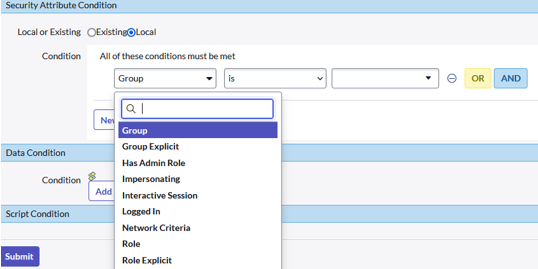
In the Vancouver release there is a new “Security Attribute Condition” added to the conditions

In the Access Controls (ACL’s):

As well as on Data filtration records:

Description
But what do these new Security Attribute Conditions mean? What do they do? There is no documentation on this in the Vancouver docs (as per the last version of August 3rd
https://docs.servicenow.com/bundle/vancouver-platform-security/page/administer/contextual-security/t...
When the Docs do not tell us about these nice new Gems, it is up to the Community to support! After a bit of digging, I found this:
| Name | Description |
|---|---|
| Group | User is member of the specified group |
| GroupExplicit | User is an explicit member of the specified group. |
| HasAdminRole | User has admin role |
| Impersonating | User is impersonating another user |
| InteractiveSession | Current session interactive |
| LoggedIn | User is logged-in/authenticated |
| NetworkCriteria | Network Criteria |
| Role | User has the specified role |
| RoleExplicit | User has the specified role explicitly, that is, it is present in the sys_user_has_role table. |
(Want to view this yourself? It is in the “sys_security_attribute”-table
< yourinstance >.service-now.com/sys_security_attribute_list.do )
Explained
If this provides you with enough information. You can stop reading here. However, I can imagine that from the description there is still some unclarity. Below I try to both visually and in text explain the concepts, so you know how to use it. In case you have any questions, feel free to comment below 
Group
User is member of the specified group
If you are added to the Netherlands Group, you are by group inheritance part of the Europe Group. Both direct assignment in the Europe group, as well as the inheritance will evaluate to TRUE.

GroupExplicit
User is an explicit member of the specified group.
Only by direct assignment in the Europe group will evaluate to TRUE.

HasAdminRole
User has admin role
Either inherited or granted directly the (System) Admin role it will evaluate to TRUE.

Impersonating
User is impersonating another user
Will evaluate to TRUE if the current logged in user is impersonating another user

InteractiveSession
Current session interactive
Allows you to distinguish between a logged in user (interactive session) and an integration (user). Returns TRUE for an interactive session.

LoggedIn
User is logged-in/authenticated
Allows you to specify if the ACL is only applicable to logged in users, or users that are not authenticated (public). Returns TRUE if the user is logged in.

NetworkCriteria
Network Criteria
Allows to filter based on IP Ranges. Specify an IP Range (record), the Network criteria will evaluate to TRUE if the user is logged in with an IP within the IP Range.

Role
User has the specified role
Both having for example the HR Manager role, inherited from HR Admin, as well as directly having the HR Manager role will evaluate to TRUE for the Role condition

RoleExplicit
User has the specified role explicitly, that is, it is present in the sys_user_has_role table.
Only having the HR Manager role directly will evaluate to TRUE.

https://www.servicenow.com/community/now-platform-articles/vancouver-security-attribute-conditions-explained/ta-p/2646179