
REST Integration using Flow Designer (Integration hub) Part 1 - HR Case Creation (step by step)
At K23, ServiceNow demo multiple product using REST integration by using Flow Designer (Integration hub) to automate their fulfillment process like:
- Order the coffee through the Barista Coffee app .
- Order the cocktail drink to auto fulfill your cocktail.
I would like to create two blogs to show how Flow Designer HR integration can make automated business transaction for HR case
- Part 1 - REST Integration using Flow Designer Part 1 - HR Case Creation
- Part 2 - REST Integration using Flow Designer Part 2 - Update HR Case (update HR case created in Part 1)
This blog will only focus on Part 1 in more detail steps. I will have part 2 posted in my coming blog.
Use Case:
When a user creates an HR case in the source system, the same HR case shall be created in the target system through Rest integration.
Activate Integration Hub plugins
Activates the ServiceNow IntegrationHub Starter Pack Installer plugin (com.glide.hub.integrations) on Personal Developer (Source instance).
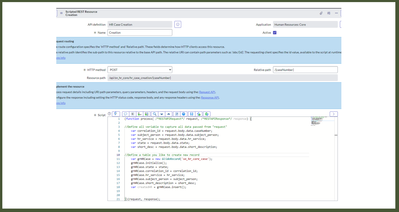
Create the script REST API in the target system
Please create the scripted Rest API in your target PDI

Create the Flow Designer Action to define HR integration
In your target PDI, open Flow Designer to create new Action blow:
Step 1 -create the action record

Step 2- configure your action record
- Define all inputs in the action record

- Define REST Integration connection access
Click + in 1 first to open "REST IntegrationHub Credentials" window and clicking Basic AUTH Credentials (2)

Defined basic access blow

Create the flow to configure pre defined the HR integration action
- Define the request details


Test your integration Action by creating new HR case

Create Flow to configure your action


Please test your flow to ensure no errors.
Create new HR case in your source PDI

Verify new HR case created by Rest integration on the target system

I hope my blog is useful to you. Please mark this blog useful to encourage me to create another blog: part 2 - Update HR case using REST integration in Flow Designer soon.
https://www.servicenow.com/community/hrsd-blog/rest-integration-using-flow-designer-integration-hub-part-1-hr/ba-p/2569782