
ServiceNow Flow Designer Sys Properties
 Ruen Smith
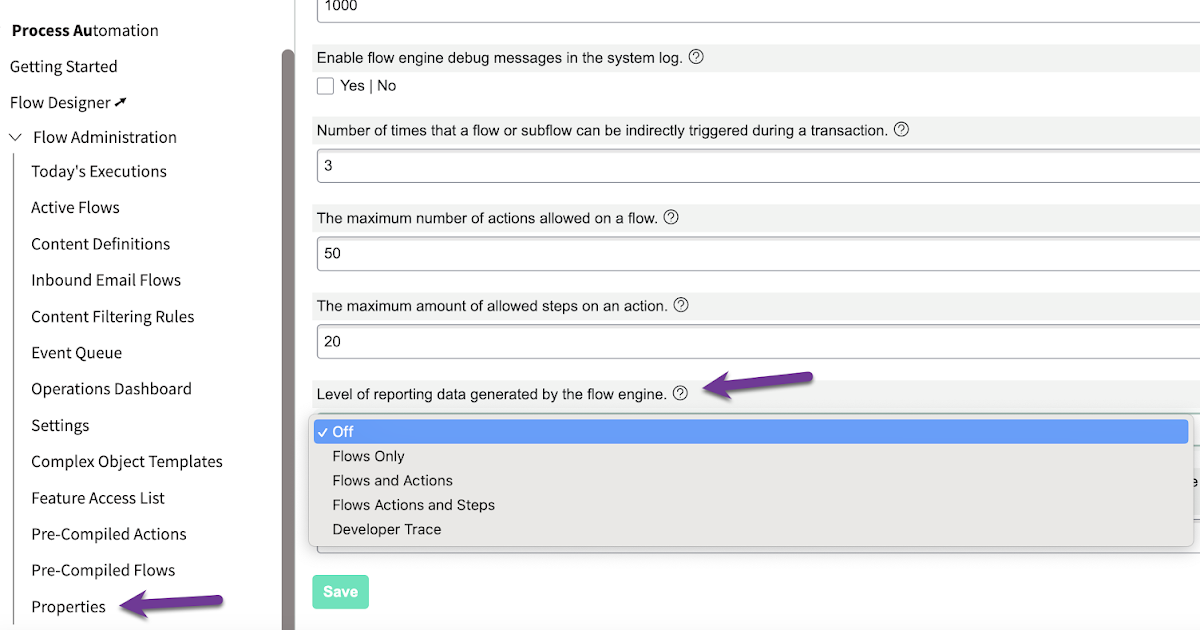
property com.snc.process_flow.reporting.level

| Level of reporting data generated by the flow engine.com.snc.process_flow.reporting.level | Specify when Flow Designer generates execution details and what information the details include. Options include:OffReporting is deactivated. The system only generates execution details when you run a test.Note: Testing an action or flow generates execution details at the Developer Trace level.Flows OnlyReporting is activated for all flows and subflows. Execution details show the status and duration of each flow and subflow run. You can see the configuration and runtime values of flow triggers and subflow inputs.Flows and ActionsReporting is activated for all flows, subflows, and actions. Execution details show the status and duration of each flow, subflow, and action run. You can see the configuration and runtime values of flow triggers and the inputs and output values of subflows and actions.Flows Actions and StepsReporting is activated for all flows, subflows, actions, and the steps of custom actions. Execution details show the status and duration of each flow, subflow, action, and the steps of custom actions run. You can see the configuration and runtime values of flow triggers and the inputs and output values of subflows, actions, and the steps of custom actions.Developer TraceReporting is activated for all flows, subflows, actions, and steps (custom and base system). Execution details show the status and duration of each flow, subflow, action, step run. You can see the configuration and runtime values of flow triggers and the inputs and output values of subflows, actions, and steps.Note: Testing an action or flow generates execution details at the Developer Trace level.The reporting level determines what if any flow execution details are generated. If a flow runs while reporting is off, execution details are never available for the flow, even if the reporting level later changes. If a flow runs while reporting is activated, execution details are always available for that flow execution, even if the reporting level later changes.Type: choiceDefault value: OffLocation: Learn more: Flow execution details |
|---|
Haven't tested these all recently within global/local scopes, so feel free to have a play! option 1 use an encoded query embedded in the GlideRecord , e.g. var grProf = new GlideRecord ( 'x_cls_clear_skye_i_profile' ); grProf . addQuery ( 'status=1^ owner=NULL ' ); grProf . query (); even better use the glideRecord addNotNullQuery or addNullQuery option 2 JSUtil.nil / notNil (this might be the most powerful. See this link ) example: if ( current . operation () == 'insert' && JSUtil . notNil ( current . parent ) && ! current . work_effort . nil ()) option 3 there might be times when you need to get inside the GlideRecord and perform the check there, for example if the code goes down 2 optional routes depending on null / not null can use gs.nil : var grAppr = new GlideRecord ( 'sysapproval_approver' ); var grUser = new GlideRecord ( 'sys_user' ); if ( grUser . get ( 'sys_id' , current . approver )){
Classic UI : var sURL_editparam = gs . action . getGlideURI (). getMap (). get ( ' sysparm_aparameter ' ); if ( sURL_editparam == 'true' ) { gs . addInfoMessage ( 'parameter passed ); } Portal : var sURL_editparam = $sp . getParameter ( " sysparm_aparameter " ); if ( sURL_editparam == 'true' ) { gs . addInfoMessage ( 'parameter passed ); }
Call a script include to apply a reference qualifier on a catalog item variable: - variable reference qualifier dependent on another variable selection, in this case a variable referencing sys_user (requested_for) On the catalog item form. variable name to apply ref qual filter : retail_equipment variable reference qualifier (on cmdb table ): javascript : new refqual_functions (). lostStolen_getAssignedCIs (); client-callable script include ( refqual_functions) function : lostStolen_getAssignedCIs : function (){ //--called from variable set client script, for lost/stolen request (service catalog) gs . log ( current . variables . requested_for , 'retail_lostStolen_getAssignedCIs' ); return ( 'install_statusNOT IN8,7owned_by=' + current . variables . requested_for ); //owned_by=1269b79937f1060041c5616043990e41install_statusNOT IN8,7 },
http://www.cloudminus89.com/2023/05/servicenow-flow-designer-sys-properties.html