
Integrating Google Cloud Platform and Google BigQuery using service accounts
Introduction
Google Cloud Platform, like AWS and Azure, is a significant cloud infrastructure service. We recently integrated GCP's BigQuery product as part of an implementation for user provisioning.
When using Service Accounts (the recommended server-to-server authentication method for these type of integrations), the provided client libraries by Google allow you to easily integrate and authenticate. However, within the Now Platform, it is not possible to use these libraries.
OAuth2 is used for GCP server-to-server authentication, but when using service accounts, it is not possible to use the clientside OAuth redirection flow. There is no client secret, only a certificate and a private key (which is not the same thing). Therefore, we can't use the built-in Now Platform OAuth2 authentication functionality.
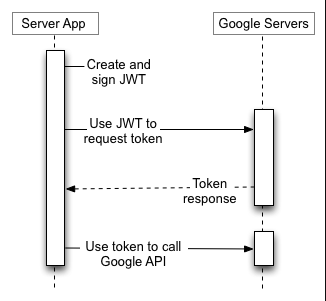
As a result, we integrated GCP by calling the REST APIs, which requires signed JWT tokens. This article walks us through that process and gives an end-to-end description of how to accomplish the integration of GCP without the use of Google's client libraries.

Image credit: Google Developer Documentation
Obtaining an access token
In order to make REST calls to Google BigQuery or other GCP platforms, we need an access token. This token is retrieved from server-to-server OAuth using a service account, as described in this documentation: https://developers.google.com/identity/protocols/oauth2/service-account
Assuming that the service account file has been provided to you (obtaining it is out of scope for this article), we need to implement the steps that are described in this section, under the HTTP/REST tab.
The idea is that we will be able to create JWT tokens that are signed with the certificates embedded in the service account file. Fortunately, the platform provides part of this functionality out of the box, through X509 certificates, JWT keystores and JWT providers. We just need to set them up.
Creating the certificates, keystores and providers
First, follow the steps in this document in order to create a Java KeyStore certificate based on the security certificate sent by Google: Create a Java KeyStore certificate. After following this documentation, you should have passwords which you used to sign, an X509 cert .pem file and a .jks keystore.
Next, we create a new entry in the X.509 Certificates table (sys_certificate):
- Type = Java Keystore
- Keystore password = as created
- Add the generated .jks file as an attachment
Afterwards, we create a JWT Keys entry in the jwt_keystore_aliases table:
- Signing keystore = the record created in the previous step
- Signing algorithm = RSA 256
- Signing key = as created
Finally, we create a new JWT Provider:
- Signing Configuration = previously created JWT Keys record
- Standard claims:
-- Name = aud, Value = https://oauth2.googleapis.com/token
-- Name = iss, Value = service account "email address" ending in .gserviceaccount.com
Obtaining a token
At this point, we are able to sign our own JWT tokens that can use to call the OAuth token endpoint:
        var scopes = [
            'https://www.googleapis.com/auth/bigquery',
            'https://www.googleapis.com/auth/cloud-platform'
        ];

        var jwtAPI = new sn_auth.GlideJWTAPI();

        var header = JSON.stringify({ });
        var payload = JSON.stringify({ scope: scopes.join(" ") });

        var jwtProviderSysId = gs.getProperty('gcp.jwt.provider.sysid');
        var jwt = jwtAPI.generateJWT(jwtProviderSysId, header, payload);

        gs.info(jwt);
I have decided to store the JWT Provider record's sys ID in a system property for easy reconfiguration.
Now we are able to create our signed JWTs, we just need to call the token endpoint on GCP and get a Bearer token. For that, I have created a new Outbound REST Message with endpoint = https://oauth2.googleapis.com/token called "Google Cloud Platform OAuth token".
I added a POST method call with No authentication, and 2 HTTP Query Parameters:
- Name = grant_type, Value = urn:ietf:params:oauth:grant-type:jwt-bearer
- Name = assertion, Value = ${jwt}


And finally we can make another function calling this REST message based on a jwt:
            var jwt = createJwt(); // output of above snippet
            var r = new sn_ws.RESTMessageV2('Google Cloud Platform OAuth token', 'Get token'); // name of your REST Message and request here
            r.setStringParameterNoEscape('jwt', jwt);

            var response = r.execute();
            var responseBody = response.getBody();

            var access_token = JSON.parse(responseBody).access_token;
            gs.info(access_token);
We have obtained a successful Bearer token to be used in calls to GCP endpoints!
Querying Google BigQuery
At this time we can call any GCP endpoint using our access token. In our case, we will query the /bigquery/v2/projects/${projectId}/queries endpoint.
Thus, we make a new REST Message, calling "Google BigQuery query" with endpoint https://bigquery.googleapis.com/bigquery/v2/projects/${projectId}/queries.
Once again we set No authentication (we will authenticate through the header), and we create a new POST method call called "Query". Here, we set the HTTP request as follows:
Headers:
- Name = Accept, Value = application/json
- Name = Authorization, Value = Bearer ${accessToken}
- Name = Content-Type, Value = application/json
And finally, our code:
            var token = createAuthToken(); // output from the previous call
            var projectId = 'YOUR-GBQ-PROJECT-ID';

            var bodyObj = { "query": query };

            var r = new sn_ws.RESTMessageV2('Google BigQuery query', 'Query');

            r.setStringParameterNoEscape('accessToken', token);
            r.setStringParameterNoEscape('projectId', projectId);
            r.setRequestBody(JSON.stringify(bodyObj));

            var response = r.execute();
            var responseBody = response.getBody();

            gs.info(responseBody);
Conclusion
In conclusion, we were able to connect to Google Cloud Platform without the Google client libraries by manually constructing and encrypting a JWT token and sending that to the OAuth endpoint, to retrieve a Bearer token.
We can then use the Bearer token to make any endpoint call within GCP, such as to GBQ's queries endpoint. However, this token can be used to authorize any other endpoint call, if the service account's scopes allow.
https://www.servicenow.com/community/developer-articles/integrating-google-cloud-platform-and-google-bigquery-using/ta-p/2510930