
ChatGPT Code Search from Servicenow
Introduction
As I have been hearing a lot about how powerful ChatGPT is, thought of integrating into Servicenow. While checking the features of ChatGPT I was really impressed with the Code Search that is offered by ChatGPT. It's very powerful and gives you the exact code as per your requirement.
Examples:
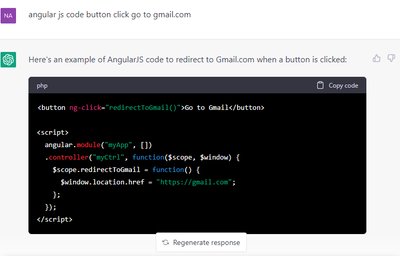
angular js code button click go to gmail.com

Servicenow code for delete a record

Step 1 - ChatGPT
Create an account in https://platform.openai.com/
Once you create account, login using the credentials and get the API Key / Bearer Token from https://platform.openai.com/docs/quickstart/build-your-application
Click on “Create new secret key”, copy the key and save it in a notepad/in some other.

Step 2 - Servicenow
Download the Update set from the Share Location
Once you commit the update set, modify the System Property called “chatgpt.token” and store the ChatGPT API Key like this in your Servicenow Instance.
Now, you are ready to use the Tool. Go to the Filter Navigator and type "ChatGPT" ==> "Code Search"
On the Search bar, type your requirement and you will get the code based on your requirement like this.
https://www.servicenow.com/community/ai-intelligence-articles/chatgpt-code-search-from-servicenow/ta-p/2475316