
Service Operations Workspace - How group the records on the "List" view?
 New article articles in ServiceNow Community
·
Dec 08, 2024
·
article
New article articles in ServiceNow Community
·
Dec 08, 2024
·
article
 Sujatha V M
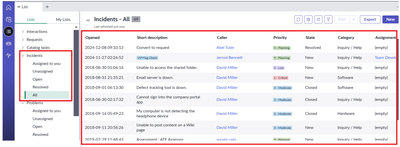
In this article, we will see how to group the records in the list view for easy access. By doing so, it helps the fulfiller to get more visibility and avoids creations of custom lists.
1. By default in Service Operations Workspace, on accessing the "All" list, it displays all the records irrespective of the user groups.

2. Make sure the scope is "Incident Management for Service Operations Workspace".
3. Navigate to UX List Categories [sys_ux_list_category] table and select "Incidents" as per the application scope.

4. Open the "Incidents" record of the list category and navigate to UX lists and select "All" record.

5. Set condition and group by as below,

6. Refresh the list view/page.

Mainly, it restricts the visibility of other records where the fulfiller is not part of.
ServiceNow #ServiceNowCommunity #ServiceOperationsWorkspace #SOW
https://www.servicenow.com/community/incident-management-sow-articles/service-operations-workspace-how-group-the-records-on-the-quot/ta-p/3122428