
ServiceNow GlideRecord: initialize versus newRecord
 Ruen Smith
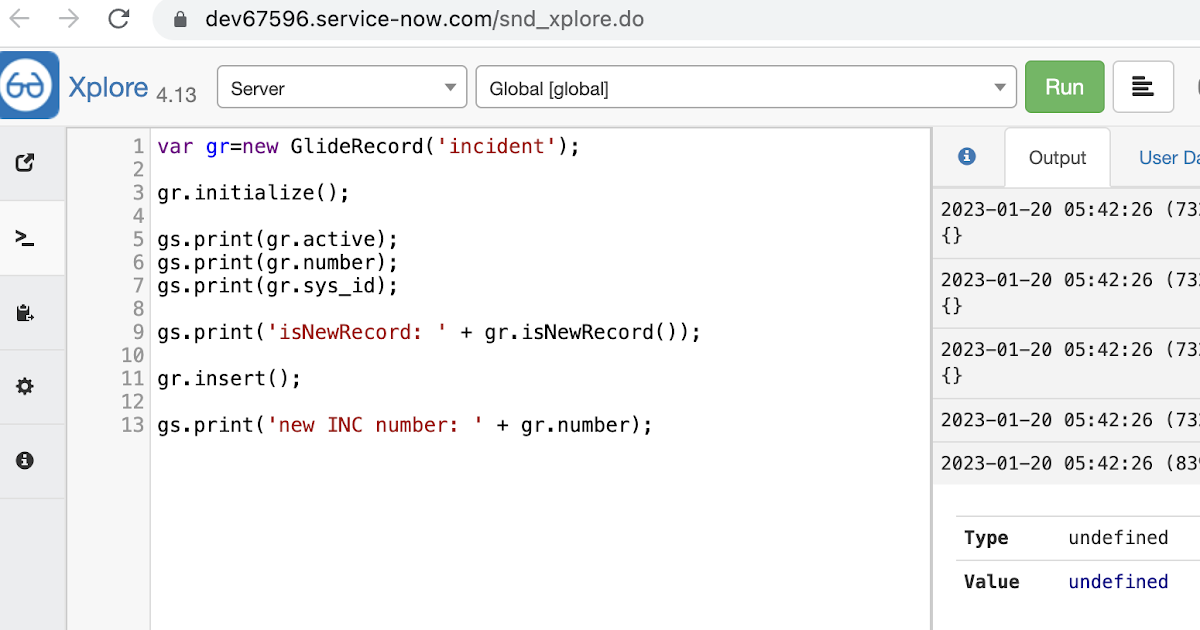
initialize documentation > Creates an empty record within the current GlideRecord that is suitable for population before an insert
> i_sNewRecord=false before insert, gs.info(gr.Active) is empty before .insert()_

newRecord documentation > Creates a GlideRecord, sets the default values for the fields, and assigns a unique ID to the record
> i_sNewRecord=true before insert,_ gs.info(gr.Active) is populated before .insert()

>fairly helpful video link here
in a nutshell, isNewRecord() allows you to query values / perform validation before the insert (e.g. if you wanted to include conditions) and populates the records holding the values in memory
in the rare case for example you wanted to create/update a related record (e.g. in a custom table) BEFORE the insert operation, newRecord() enables values to be referenced
example:
var gr=new record ('incident)';
gr.initialize() / gr.newRecord()
gs.print(gr.active);gs.print(gr.sys_id);gs.print(gr.number);
gs.print();
gr.insert();
===
from Chuck Tomasi in this article,
"
- initialize(): Creates an empty record suitable for population before an insert.
- newRecord(); Creates a GlideRecord, set the default values for the fields and assign a unique id to the record.
Try these two in scripts background and you'll see that initialize gives no value to opened_at, whereas newRecord does.
var inc = new GlideRecord('incident');
inc.initialize();
gs.print(inc.opened_at.getDisplayValue());
var inc = new GlideRecord('incident');
inc.newRecord();
gs.print(inc.opened_at.getDisplayValue());
I have always trusted newRecord more since learning about this a few years ago."
(ServiceNow )
Haven't tested these all recently within global/local scopes, so feel free to have a play! option 1 use an encoded query embedded in the GlideRecord , e.g. var grProf = new GlideRecord ( 'x_cls_clear_skye_i_profile' ); grProf . addQuery ( 'status=1^ owner=NULL ' ); grProf . query (); even better use the glideRecord addNotNullQuery or addNullQuery option 2 JSUtil.nil / notNil (this might be the most powerful. See this link ) example: if ( current . operation () == 'insert' && JSUtil . notNil ( current . parent ) && ! current . work_effort . nil ()) option 3 there might be times when you need to get inside the GlideRecord and perform the check there, for example if the code goes down 2 optional routes depending on null / not null can use gs.nil : var grAppr = new GlideRecord ( 'sysapproval_approver' ); var grUser = new GlideRecord ( 'sys_user' ); if ( grUser . get ( 'sys_id' , current . approver )){
Classic UI : var sURL_editparam = gs . action . getGlideURI (). getMap (). get ( ' sysparm_aparameter ' ); if ( sURL_editparam == 'true' ) { gs . addInfoMessage ( 'parameter passed ); } Portal : var sURL_editparam = $sp . getParameter ( " sysparm_aparameter " ); if ( sURL_editparam == 'true' ) { gs . addInfoMessage ( 'parameter passed ); }
Call a script include to apply a reference qualifier on a catalog item variable: - variable reference qualifier dependent on another variable selection, in this case a variable referencing sys_user (requested_for) On the catalog item form. variable name to apply ref qual filter : retail_equipment variable reference qualifier (on cmdb table ): javascript : new refqual_functions (). lostStolen_getAssignedCIs (); client-callable script include ( refqual_functions) function : lostStolen_getAssignedCIs : function (){ //--called from variable set client script, for lost/stolen request (service catalog) gs . log ( current . variables . requested_for , 'retail_lostStolen_getAssignedCIs' ); return ( 'install_statusNOT IN8,7owned_by=' + current . variables . requested_for ); //owned_by=1269b79937f1060041c5616043990e41install_statusNOT IN8,7 },
http://www.cloudminus89.com/2023/01/servicenow-gliderecord-initialize.html