
ServiceNow Scripted Extension Points
 Ruen Smith
see link:
and
search script includes with script contains GlideScriptedExtensionPoint
My own test example:
1) script include
create a new script include include (in below example, I have called this rds_test_extens_point), and add code similar to below:
var rds_test_extens_point = Class.create();
rds_test_extens_point.prototype = {
initialize: function() {
},
process:function(param1,param2){
gs.print('hello');
var result = [];
try{
var epoints = new global.GlideScriptedExtensionPoint();
var eps = epoints.getExtensions("rdsTestExtPt");
//gs.print('eps.length::' + eps.length);
for (i=0;i<eps.length;i++){
var point = eps[i];
//gs.print(point.type);
if (point.type=='rdsTestExtPt' || point.type=='rdsTestExtPt_2' ){ //--check is actually not necessary, but illustrates how you can get to the script include name using .type gs.print('found func'); var res=point.rdsNewFunction('','');
gs.print(res); }
//--in case the script includes actually contained different function names, could use below approach-but might defeat the purpose a little!
/*if (point.type=='rdsTestExtPt_2'){
gs.print('found func 2');
var res2=point.rdsNewFunction_2('','');
gs.print(res2);
}*/
}
} catch(ex) {
gs.error("Error running extension points!");
}
return result;
},
type: 'rds_test_extens_point'
};
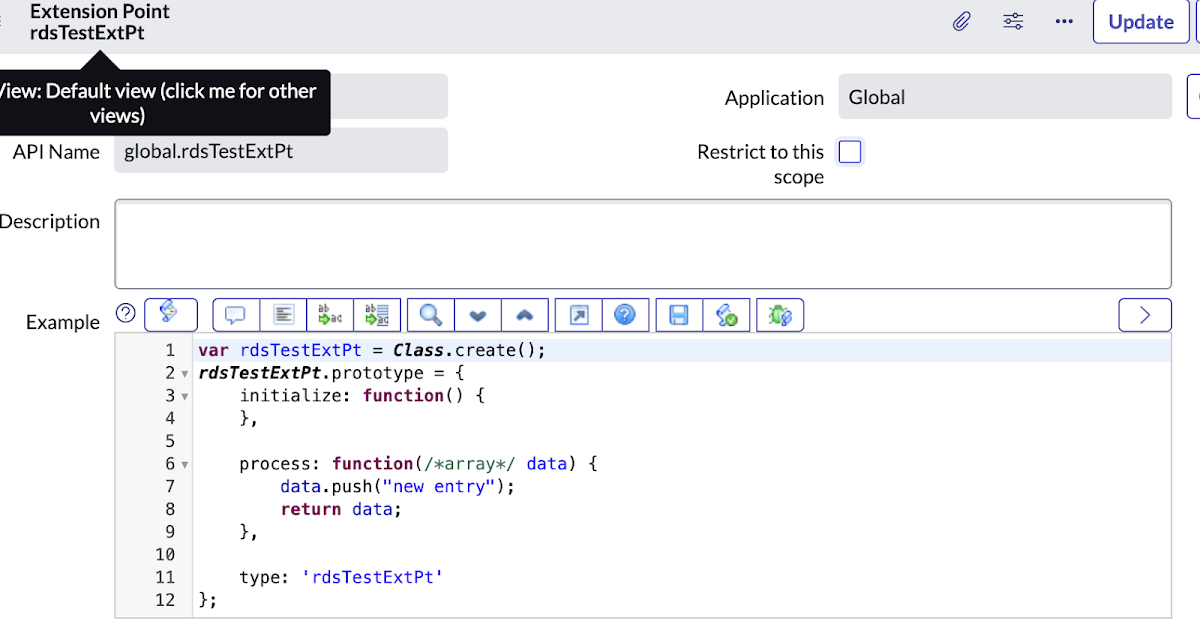
2) scripted extension point [sys_extension_point]:

3) extension instance [sys_extension_instance]:
click 'create implementation' to create below 2 script includes

each of the items in the 'Class' column is a new script include, the one with order 100 contains a function rdsNewFunction and the one with order 200 also contains a function rdsNewFunction- these functions each return a simple test string
4) background script:
var si=new rds_test_extens_point().process('a', 'b');
output:
*** Script: hello*** Script: eps.length::2*** Script: rdsTestExtPt*** Script: found func 1*** Script: test 1234 blah blah blah*** Script: rdsTestExtPt_2*** Script: found func 2
*** Script: test ZZZZ func 2
OOTB example 1:
search for script includes that contain the following line of script:
var extensionPoints = new GlideScriptedExtensionPoint().getExtensions
1) example script include: GetOutputFieldTypes
var epoints = new global.GlideScriptedExtensionPoint();
var eps = epoints.getExtensions("mlOutputFieldTypeExtPt");
2) scripted extension point [sys_extension_point]: global.mlOutputFieldTypeExtPt
scroll down to the implementations (extension instances)
3) extension instance [sys_extension_instance]: global.mlOutputFieldTypeExtPt
you can see how this links the script include to the scripted extension point - note in this example this references a different script include called mlOutputFieldChoicesOOB

if you click through to that class (the script include) you can see the function getMLOutputFieldChoices
this is called via the first script include
(
var epoints = new global.GlideScriptedExtensionPoint();
var eps = epoints.getExtensions("mlOutputFieldTypeExtPt");
if (eps.length > 0){
var point = eps[0];
result = point.getMLOutputFieldChoices(tableName,capability);
}
)
OOTB example 2
out of the box scripted extension - below example is within the global application scope:
1) script include: RelateClosedIncidentsToProblem
see description
2) scripted extension point [sys_extension_point]: global.BulkAddIncidentsFilter
scroll down to the implementations (extension instances)
3) extension instance [sys_extension_instance]: global.BulkAddIncidentsFilter
you can see how this links the script include to the scripted extension point:

can navigate back to the extension point by clicking the 'go to definition' link
(ServiceNow )
http://www.cloudminus89.com/2023/01/servicenow-scripted-extension-points.html