
HR Security Evaluation: ACL's and COE Security Policies
HR Security ACL's and COE Security Policies
HR is slightly different from the rest of the Platform, as it provides us with COE Security Policies in addition to ACL's. To create the COE Security Policies, please find the Docs article here: Create a COE security policy
In a future article I will share some of the Best Practices on setting up your COE Security Policies to help secure your HR Case data.
Evaluation
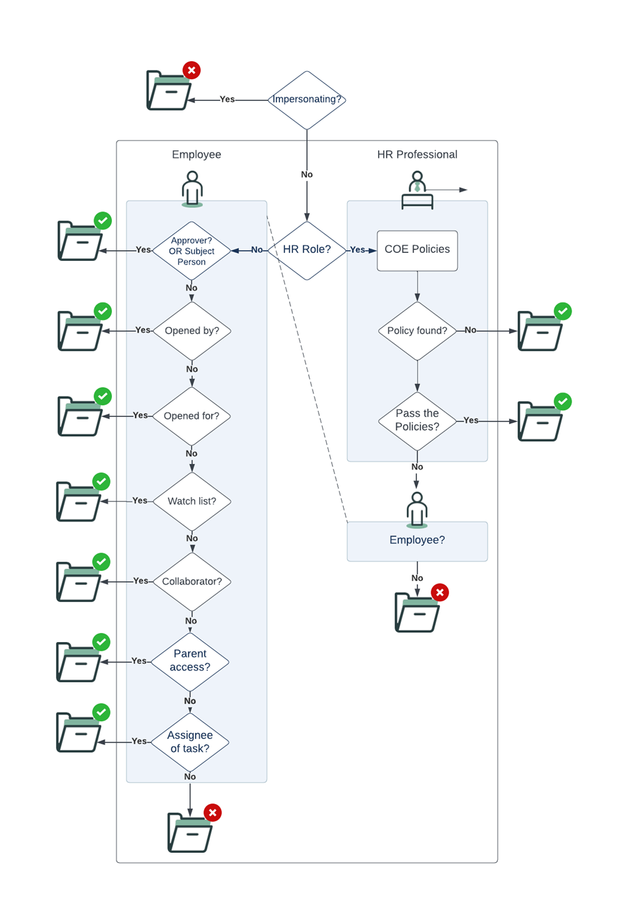
To help understand how the security is evaluated, and who gets access, I have created the following image:

- It will first determine if the logged in user is impersonating another user. If so, it will deny access to the case (depending on your configuration. See step 5 of this article:HR Security setup: (HR) Admin ).
- Then it will determine if the user has one or many HR Role(s).
If yes, the User is an HR Professional. If not, the user is an Employee. - Are there COE policies that match the HR Case table/COE the user is trying to access?
No policies = Access ( Note: This means if you have not set up any, all HR Professionals will have access!)
 - If there are policies found, it will review them and allow or deny based on Group membership in the mentioned groups of that COE Security Policy.
- If based on the roles or policies the HR Professional does not have access, the system will (double)check if the user could have access based on the Employee checks (see @rhysbrennan comment).
- Approvers are allowed access.
- Opened by is allowed access.
- Opened for is allowed access.
- People on the Watch list are allowed access.
- Collaborators are allowed access.
- If the user has access to the Parent record is allowed access.
- Assignee of the task is allowed access.
Edit 20/06/2023 based on @rhysbrennan remarks of the Employee check that happens after HR Professional fails policies.
Labels:

https://www.servicenow.com/community/hrsd-articles/hr-security-evaluation-acl-s-and-coe-security-policies/ta-p/2386714