
Service Operations Workspace – Missing catalog items
 New article articles in ServiceNow Community
·
Nov 29, 2024
·
article
New article articles in ServiceNow Community
·
Nov 29, 2024
·
article
 Sujatha V M
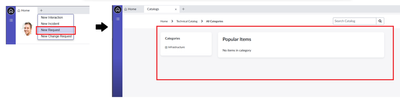
When the user tries to create a new request within the workspace using the "+" icon on the landing page, it routes to the workspace portal but doesn't show up all the catalog items.
Below are steps to be implemented to overcome the issue,
➡️ Clicking on the “+” icon to create new request, it routes portal page but doesn’t display all the catalog items.

➡️ Navigate to Service Portal -> Portals

➡️ Open the Service Workspace Portal record. In the “Catalogs” related list it displays only “Technical Catalog”. In some instances, it may show "Standard Change Catalogs" or other.

➡️ Click on the “Edit” and add “Service Catalog” to display the items.

➡️ Refresh the landing page and try again it displays the catalog items.

#ServiceNow #Community #ServiceOperationsWorkspace #SOW @Servicenow
https://www.servicenow.com/community/incident-management-sow-articles/service-operations-workspace-missing-catalog-items/ta-p/3116364