
Service Operations Workspace – How to create a shortcut option to route to “Catalog” home page?
 New article articles in ServiceNow Community
·
Nov 28, 2024
·
article
New article articles in ServiceNow Community
·
Nov 28, 2024
·
article
 Sujatha V M
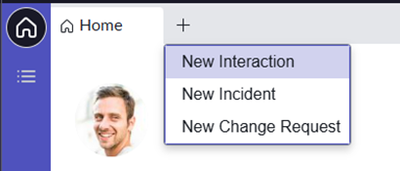
By default, Service Operations Workspace doesn't provide the shortcut option for creating new request from the workspace.
1. On the Service Operations Workspace, on click of the “+” icon by default it displays the below option,

2. Navigate to “Now Experience Framework -> Experiences [sys_ux_page_registry] -> Service Operations Workspace”

3. Open the record and scroll to UX Page Properties and select “chrome_tab”

4. Append the below JSON script to the existing accordingly,

5. Refresh the Service Operations Workspace screen, click on the “+” again,

6. On click of the “New Request” option, it routes the catalog page (like portal) for request submission.

Note: “New Request” option might show up for admins but not for “ITIL” users because the Catalog item [sc_cat_item] table holds a “Create” ACL restriction which allows only the users with “Catalog admin” role can create the requests.

Generally, the above use case might require customization as per the requirement needs to accommodate ITIL users but try your best to make use of the existing behavior.
ServiceOperationsWorkspace #ServiceNow #Workspace #ServiceNowLearning
https://www.servicenow.com/community/incident-management-sow-articles/service-operations-workspace-how-to-create-a-shortcut-option-to/ta-p/3115242