
Report Library
 Blog - ServiceNow Elite
·
Jul 09, 2020
·
article
Blog - ServiceNow Elite
·
Jul 09, 2020
·
article
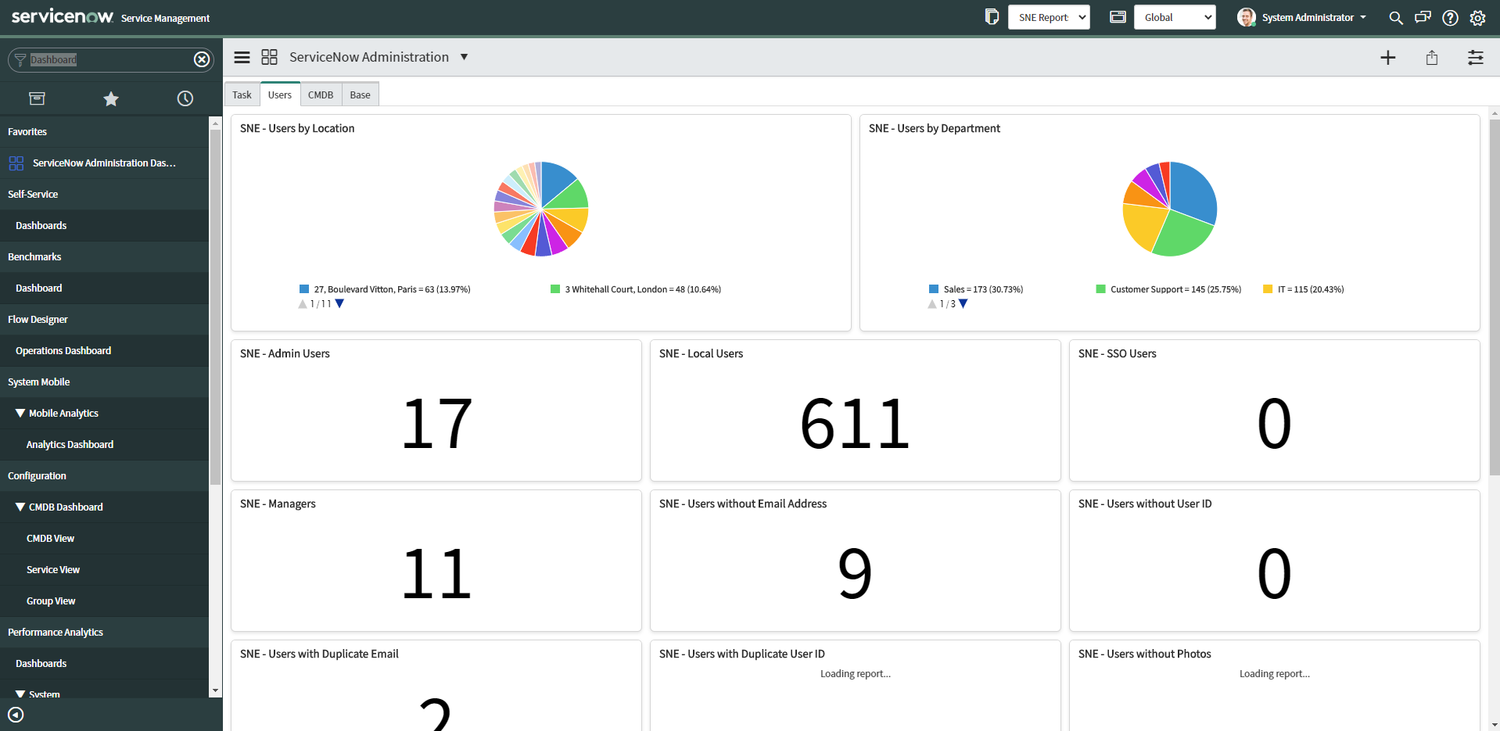
Download a collection of administration and maintenance reports contained in a dashboard.
- Maintenance Reports. Most ServiceNow instances have common issues that need periodic review. This dashboard includes many of these issues within a single dashboard
- Scripted Filter Examples. Many of the reports use a scripted filter, which may be help as examples in building other reports.
- Dashboard. You might consider using this dashboard as a starting point and building it out from there. Of course, if there is a report that is not relevant to your organization, just remove it from the dashboard.
Let me know in the comments of any reports to add and I will look into adding them to a later release!
Installation
- Download zip file of Update Set: Admin_Reports_ServiceNowElite.xml
- Login as an admin in destination instance. Always deploy into your development instance first and test before installing into production.
- Left Navigator Bar > Retrieved Update Sets
- Scroll to the bottom, under Related Links, click Import Update Set from XML
- Select Retrieved Update Set
- Preview and Commit Update Set
Usage
Open the Dashboard: ServiceNow Administration. It has 4 tabs, Task, Users, CMDB, and Base

Tab 1: Task
- Active Requests with All Closed Items - Utilizes a scripted filter from the “SNEReports” script include. Cycles through active requests and finds ones with all closed requested items. Stages were not used in a workflow correctly and the Request isn’t being automatically closed when all Requested Items are closed.
- Approval on Closed Tasks - The related task to the approval was already closed. The approval is no longer necessary or task was worked on before approval.
- Approver is deactivated - The approver was deactivated, so the approval will never complete. Recommend switching the approver to their manager or delegate.
- Caller is deactivated - On an incident, the caller on the incident is deactivated. Do you still need to fix the issue, depends on the situation. It may just be the users laptop or it may be an enterprise impacting incident. You may have to switch the caller if the incident still needs resolution.
- Groups with Most Tasks - Although a group having the most tasks can either be a positive or negative, it is something to be investigated if it is a dramatic difference between groups
- Old Active Tasks - Active tasks over a year old. Consider closing these tasks
- Old Approvals - Requested approvals over a year old. You might ask those approvers to approve the request or cancel the request for them
- Open Tasks with Assigned to Deactivated - Remove the assigned to person or assign to new user
- Requested Items for deactivated users
- Requests with No Items - There may be an issue with a record producer or a request was created accidentally. Most often these requests can be closed
- Tasks with Duplicate Number - There may have an integration causing this issue, or perhaps a business rule using current.update(), which should be fixed
- Tasks with inactive assignment groups - These tasks should be switched to active groups and any jobs or workflow that
- Tasks with Inactive Opened By - This is another situation, where the task might not be needed anymore as it was opened by someone that is now left the company
- Users with Most Tasks - Although a user having the most tasks can either be a positive or negative, it is something to be investigated if there is a dramatic difference

Tab 2: Users
- Active Delegates - Usage of the delegate feature in ServiceNow is helpful and you may want to promote that feature within your organization
- Admin Users - Recommend keeping the number of admin users to minimum
- Local User Accounts - If you have LDAP or SSO, you may consider reducing the number of these accounts
- Managers - Shows the number of managers listed in your user directory. This uses a scripted filter to calculate
- SSO Users - List of users using SSO or LDAP to login
- Users by Department - Pie chart of users by department
- Users by Location - Pie chart of users by location
- Users with Duplicate Email - This issue might be caused by import that needs adjustment. This uses a scripted filter to calculate
- Users with Duplicate User ID - this issue shouldn’t occur anymore due to unique keys, but might happen on instances upgraded from earlier versions of ServiceNow. This uses a scripted filter to calculate
- Users without Company - Review if you are using the company field for ACLs or domain-separation
- Users without Cost Center - Review if you use the user cost center for certain calculations within SerivceNow
- Users without Department - Review if you use the user department for ACLs or certain calculations within SerivceNow
- Users without Email Address - If these users are logging or incidents are created on their behalf, an email should be added
- Users without Location - Review if you are using the location field for ACLs or other features
- Users without Photos - If you are using the LDAP Photo import, this may be helpful for fixing issues with the photo import
- Users without Title - Review if you are using the location field for ACLs or Catalog Client Scripts
- Users without User ID - These users can’t login without a user id. That might be intentional depending on usage

Tab 3: CMDB
- Assets By Class - Review if numbers are correct for classes
- Assets without related CI - Model categories may need adjustment if this is an issue for these records
- CIs By Class - Review if numbers are correct for classes
- CIs with Duplicate Serial Number - Duplicate CIs should always be on the lookout for, as they are difficult to clean up.
- Computers by Location - Adjust Discovery schedules if data is incorrect
- Computers without Software - Helpful when CIs are not being discovered correctly
- Configuration Item without related Asset - Model categories may need adjustment if this is an issue for these records
- Discovered Configuration Items - This may need adjustment based on discovery sources used
- Model Categories without Asset Class - Add asset class to model categories you want the CI class to create a corresponding asset
- Servers By OS - Useful when determining what servers need an OS upgrade

Tab 4: Base
- Committed Update Sets (Last 7 Days) - Review committed update sets
- These reports below can help determine if companies, cost centers, departments, or locations can be merged or updated
- Companies without a related CI
- Companies without a related User
- Cost Centers without a related CI
- Cost Centers without a related User
- Departments without a related User
- Locations without a CI
- Locations without a related User
- Locations without a Task
- Companies without a related CI
- Error Logs (Today) - This report was built by modifying specific report XML, as logs are not available in the reporting application
- Expired KB Articles - Change the Valid to date or retire articles
- Group Manager No longer Active - Add a new group manager
- Groups with all Deactivated Group Members - This group doesn’t have any valid users in it. You may want to deactivate the group or add new group members
- Groups without Group Members -
- KB Feedback - Respond to feedback and make changes
- Large Attachments - Top Ten - You may want to eliminate very large attachments in your instance. This report was built by modifying specific report XML, as attachments are not available in the reporting application
- Mid Servers - Check if midservers are operational
- Script Log Statements (Today) - Use this report to assist in debugging. This report was built by modifying specific report XML, as logs are not available in the reporting application
- Warning Logs (Today) - This report was built by modifying specific report XML, as logs are not available in the reporting application
- Workflow with Errors - There is an issue with an workflow and it is not completely correctly
View original source
https://www.servicenowelite.com/blog/2020/7/8/report-library