
How to setup a Default Filter for a related list in SOW for an incident record
 New article articles in ServiceNow Community
·
Jun 06, 2025
·
article
New article articles in ServiceNow Community
·
Jun 06, 2025
·
article
 SANDEEP DUTTA
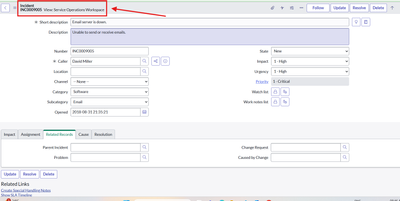
1. Open any one of the incident Record in the native UI/ Next Experienece , make sure you select the view as your required workspace (here i have selected as SOW) :

2. Scroll down and select the related list tab where you want to apply the filter :

3. Select the filter icon and add your filter conditions :

4. Click Set as Default Filter.

5. Now if you go to The workspace, you will see the Default filter has been applied :

Hope you learned something new 🙂
Sandeep Dutta
View original source
https://www.servicenow.com/community/service-operations-workspace/how-to-setup-a-default-filter-for-a-related-list-in-sow-for-an/ta-p/3282790