
Looking through your eyes
 sys.properties
·
Oct 25, 2014
·
article
sys.properties
·
Oct 25, 2014
·
article
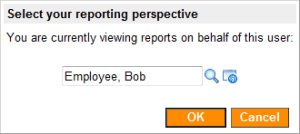
Quite often there is a need to set up reports that return different results depending on who runs them. In versions before Dublin, it could be done fairly easily using scripted filters. With introduction of dynamic filter options in Dublin, this feature has become even more intuitive as you no longer need to memorize things like gs.getUserID() or getMyGroups(). What is not as straightforward, however, is testing of such reports.
In many cases, reports are created by non-admin users directly in a production instance where for security reasons you cannot allow them to impersonate other users (those who will be using the reports). Requiring all reports to be created in a test instance first is also not an option. Non-admin users will not be able to transfer reports between instances and will either have to redo them in production or involve system administrators, which is too much of an overhead. Besides, a test instance may not have the most recent data even if you clone it from production regularly.
If this problem sounds familiar to you, here is a workaround you might find helpful. Instead of using gs.getUserID() or getMyGroups() in reports, you can create your own functions that will return the ID or the list of groups of another user depending on the value of a user preference:
- Create a very simple UI page with a reference field pointing to Users [sys_user] table. This is where your report creators will choose a user through whose eyes they want to view reports. Use processing script to save their selection as a user preference.
- Make this UI page accessible via a module in the navigation pane, a UI action in the user’s profile, or elsewhere. Since the page is so simplistic, you may want to display it in a GlideDialogWindow to make it look elegant.

- In a global business rule, define functions that will read the user preference and return results based on its value. If no preference is set for the current user, these functions should default to the out-of-box ones, such as gs.getUserID() or getMyGroups().
function getRepUserID() {
var view_as_user = gs.getUser().getPreference('view_reports_as');
if (view_as_user == null || view_as_user == '')
view_as_user = gs.getUserID();
return view_as_user;
}
function getRepGroups() {
var view_as_sys_id = getRepUserID();
var view_as_groups = gs.getUser().getUserByID(view_as_sys_id).getMyGroups();
return view_as_groups;
} - If you have already upgraded to Dublin, create dynamic filter options that will leverage the new functions and, optionally, hide the out-of-box ones.

Attention! This solution does not change the security context in any way. Results returned by the reports will be constrained by security rules applicable to the current user, not the one indicated in the user preference.
https://sys.properties/2014/10/25/looking-through-your-eyes/