
What’s so unique about the sys_id?
 sys.properties
·
Sep 17, 2024
·
article
sys.properties
·
Sep 17, 2024
·
article
What is a sys_id? This question is a no-brainer, right? It’s the 32-character long gobbledygook that consists of random numbers and letters and uniquely identifies every record in every ServiceNow instance. Well, if that’s what you think it is, read on and be ready for some surprises.
Even though the sys_id is one of the fundamental concepts in ServiceNow, every now and then I get to see misinterpretations and false assumptions related to it. Even the definition from the product documentation is not 100% accurate:
A unique 32-character GUID (Globally Unique ID), called a Sys ID (sys_id) identifies each record in an instance.
Let’s take a closer look at some of the most common myths around the sys_id.
Misconception #1: Every sys_id is a 32-digit hexadecimal number
We often get to see sys_id values consisting of digits 0–9 and letters a–f in ServiceNow instances, and it is easy to assume that all of them look like that, but is that actually the case? Indeed, all records you create as a user or an administrator of the system normally use exactly that format for the sys_id because that is how the algorithm generating those values works. However, sys_id is essentially just a string. So technically, it can be any string. Can it be more than 32 characters long? No, because the length of the sys_id field is set to 32 characters. Can it be shorter than that? Sure, why not?! Does it have to consist of digits 0–9 and letters a–f only? Not really. Are there records in the base system with such unconventional sys_id values? You bet!
For records in System Plugin [v_plugin] table, sys_id is either equal to the plugin ID (e.g., com.glide.tiny_url) or to its last 32 characters if the ID is longer than that, with hyphens replaced by underscores (e.g., unified_notification_preferences for com.sn_unified_notification_preferences plugin). I have no clue what they had against hyphens, given that the sys_id of the Default view UI View [sys_ui_view] record is… Default view (yes, just like that, with a whitespace in between).

The sys_id of the Global Application [sys_scope] is global. The sys_id of the System Import Sets Application Menu [sys_app_application] is import_sets.
In the Operation [sys_security_operation] table, records create, read, write, delete, and execute have sys_id values matching their names. And so do all records in the Mailbox [sys_mailbox] table.
Almost three dozen Currency [fx_currency] records use 3-letter currency codes as their sys_id. For example, USD for $, GBP for £, JPY for ¥, EUR for €, etc. And if you think that those are the shortest sys_id values in the base system, I am afraid you are wrong. There are at least two 2-digit and five 1-digit sys_id values in every ServiceNow instance, but I’d rather leave it to you to discover them on your own if you wish to.
Interestingly, there are also a handful of sys_id values that look very much like the standard ones, except that they either contain one or more letters that are not in the a–f range or are one digit short (i.e., are 31 characters long). And if the handcrafted sys_id values from the early days of the platform are easily explainable, such nearly conventional values, some of which are quite modern (only about a year old), are truly a mystery for me. If you happen to know anything about the circumstances, in which they emerged, do let me know in the comments.
Misconception #2: Every record has a sys_id
It might surprise you, but there are tables in ServiceNow that don’t have the sys_id column at all. Of course, you don’t have to take my word for granted, so if you would like to see some examples, feel free to open your PDI and check the dictionary entries for [cmdb_ire_partial_payloads_index], [pa_favorites], or [sys_rollback_sequence] table.
Misconception #3: Every sys_id in each instance is unique
The algorithm for sys_id generation is designed in such a way that no sys_id is generated twice. However, when records are inserted into the database, uniqueness of the sys_id is only enforced at the table, or rather at the table hierarchy level, to be precise. This means you cannot have multiple records with the same sys_id in the same table or in tables that have a common ancestor class. However, it is by all means technically possible to have records in different table hierarchies (for example, a task and a CI) share a sys_id.
Misconception #4: Base system records have the same sys_id across all instances
This is precisely what the product documentation tells us:

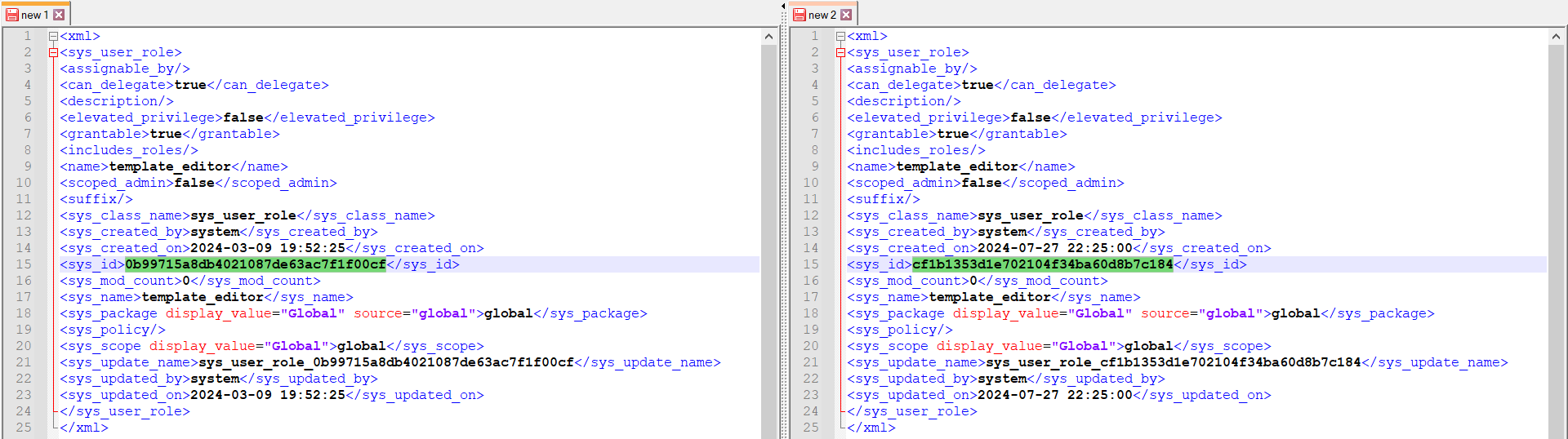
While a vast majority of base system records have a fixed sys_id that is repeated in every ServiceNow instance, there are some exceptions to this rule. When an instance is provisioned, not all records are copied at the database level or imported as XML files. Some of them are generated by scripts. And like any other record generated by a script, they get a new sys_id and a different sys_created_on timestamp every time. The role template_editor is an example of such a record, but it is by far not the only one. Numerous ACLs in every instance have this peculiarity.

So what?
“Why would I care about all these edge cases?” you might ask. In my opinion, there are several good reasons why you should. In fact, such exceptions are much more frequent than you may think.
1. Potential deployment issues
As we have seen, some base system records have a different sys_id in every instance. If you ever have to make changes to them, you can get in trouble trying to deploy your changes between instances. Therefore, for a new ServiceNow environment, consider cloning the production instance over all non-production ones before starting any implementation activities.
2. Potential data validation issues
I have seen people use regular expressions like the one below for sys_id validation in scripts and even seem to recall it being broadcast as a leading practice in one of the Knowledge conference sessions a few years ago.
var pattern = /[0-9a-f]{32}/;
While it is generally a good idea to validate data before using it, given that a sys_id does not necessarily have to follow the usual format, such excessive scrutiny can lead to false positives if your code has the potential accept any record from any table as its input.
3. Potential invalid queries
Wrongfully assuming that a sys_id is always present can cause bad queries. As a result, warnings like this can appear in the system log:

In table-agnostic scripts, consider using [isValidField()](https://developer.servicenow.com/dev.do#!/reference/api/washingtondc/server%5Flegacy/c%5FGlideRecordAPI#r%5FGlideRecord-isValidField%5FString?navFilter=isvalidfield) method of the GlideRecord API to double check the existence of a column before querying it.
Conclusion
Now that you realize how tricky and diverse the sys_id can be, how many mistakes can you find in the definition from the first paragraph of this post? 
On a more serious note, the key takeaway is to never make blind assumptions about system configuration and data structures. Entities you believe you know well can often exhibit properties or behaviors you don’t expect. If there are records without a sys_id, can you be assured that every table has, let’s say, the sys_updated_on column? I think you know the answer.
https://sys.properties/2024/09/17/whats-so-unique-about-the-sys_id/