
The unmatched sys_id
 sys.properties
·
Oct 09, 2024
·
article
sys.properties
·
Oct 09, 2024
·
article
In the previous post, we discussed what a sys_id is or is not and debunked a couple of widespread myths. Upon reading it, you could get a false impression that the sys_id had no more gotchas in store, but I would argue it does have a couple more cards up the sleeve. So let’s see if it can surprise you once again. This time, we will take our study one step further and examine when the sys_id is (or maybe isn’t) used. If you don’t mind, I’ll continue the numbering from where we stopped last time.
Misconception #5: Any reference field stores the sys_id of the referenced record
ServiceNow’s scripting technical best practices contain the following statement:
The value of a reference field is a sys_id.
Should we take it for granted? If you read my previous post, you know that sometimes there are subtleties that are not reflected in the official documentation. On the one hand, this makes me feel a little bit uncomfortable, but on the other hand, it is a great source of inspiration for my blog. So let’s check it out.
If we look at the Dictionary Entry form of assigned_to field in the Task [task] table, we will easily notice three reference fields: Application, Type and Reference, pointing to Application [sys_scope], Field class [sys_glide_object] and Table [sys_db_object] tables respectively.

Now let’s take a look at the values of those reference fields:

Hmm… None of those values look like a sys_id, do they?
An attentive reader will recall the learning from the previous post that the Global application’s sys_id is literally global. No wonder that that’s the actual value of the sys_scope field, but what about the other two? It is tempting to assume that tables and field classes also have unconventional sys_id values, but they don’t. So what is going on here?
Reference fields can be configured to use an attribute other than sys_id as the unique identifier. For that purpose, a field called Reference key is available in the advance view of the Dictionary Entry form:

It turns out both Reference and Type fields use name attribute as the reference key:

_“Okay, good to know, but how often is this special setup actually used? Surely, not too often?” you might be wondering. Well, in a clean Xanadu instance, more than 6% of all reference fields are configured this way. It is up to you to decide if that’s a negligible amount. I don’t think so.
What this means from a practical standpoint is that, although in most cases dot-walking to a sys_id is a bad idea as ServiceNow’s scripting technical best practices suggest, in some situations it can be a necessity.
Note: Although, as mentioned above, you will sometimes come across this type of configuration in the base system, do not abuse it in your custom development. Using some human-readable value instead of an obscure sys_id as a reference key can be appealing; yet by doing so, you are substituting it for a GUID (i.e., a globally unique identifier). Therefore, it is only safe to do so if the values you are planning to use are indeed globally unique.
Misconception #6: References in customer updates are always looked up by sys_id
Imagine the following scenario:
Customer: We need a ticketmanager role. It should allow creating and updating Tickets.
Developer: Okay.
Customer (two days later): We’ve decided the ticketmanager role should be able to delete Tickets too.
Developer: Okay.
Customer (a week later): Since the ticketmanager role can also delete Tickets, we should call it ticketadmin instead.
Developer: It is not a good practice to rename roles…
Customer: That was requested by the CIO.
Developer (with a sigh of despair): Okay.
Customer (two weeks later): You know what… In addition to the ticketadmin role, we need a ticketmanager role anyway. Same permissions as ticketadmin except deletion.
Changing requirements are a common challenge for software implementation projects. In our simplified example, it is fairly easy to recognize what’s going on and to take appropriate countermeasures in a timely manner. In a real project, however, there are lots of other things happening in parallel, which makes it difficult to spot important dependencies. It is by no means impossible that each of the small changes requested by the careless customer gets implemented by a different developer and in a different update set and that the update sets get deployed to the next instance in an intricate (if not random) order.
Now let’s conduct a small thought experiment. Let’s assume that the changes were made in DEV in the following order and captured in three update sets as indicated the table below:
| Order | Action | Update Set |
|---|---|---|
| 1 | Creation of ticket_manager role | Update_Set_1 |
| 2 | Creation of ACLs for create, read and write operations with ticket_manager role in “Requires role” embedded list | Update_Set_1 |
| 3 | Creation of an additional ACL for delete operation with ticket_manager role in “Requires role” embedded list | Update_Set_2 |
| 4 | Renaming of ticket_manager role to ticket_admin | Update_Set_1 |
| 5 | Creation of a new ticket_manager role | Update_Set_3 |
| 6 | Creation of ACLs for create, read and write operations with new ticket_manager role in “Requires role” embedded list | Update_Set_3 |
After successful testing in DEV, the update sets got committed to the TEST instance in the following order without a single warning during the preview:
- Update_Set_3
- Update_Set_2
- Update_Set_1
What each of the two roles will be able to do in TEST? Will they work as requested by the customer? Why or why not? Take a moment to ponder this scenario and then read on to see if you got it right.
Note: Renaming roles is generally not a good practice because they are referenced by name in scripts. If, despite me declaring this exercise a thought experiment, you followed along in your PDI, you most probably got stuck at step #4 because in the latest versions of ServiceNow renaming roles is prevented by an ACL. However, until recently, this was not the case. Nor is it the case for other types of records that also exhibit the peculiarity we are going to deal with in this article.
In our example, though, we did not use any scripting in our ACLs. Moreover, the role we renamed had just been set up and could not be used in any other scripts either. So what could possibly go wrong? Nothing, right?
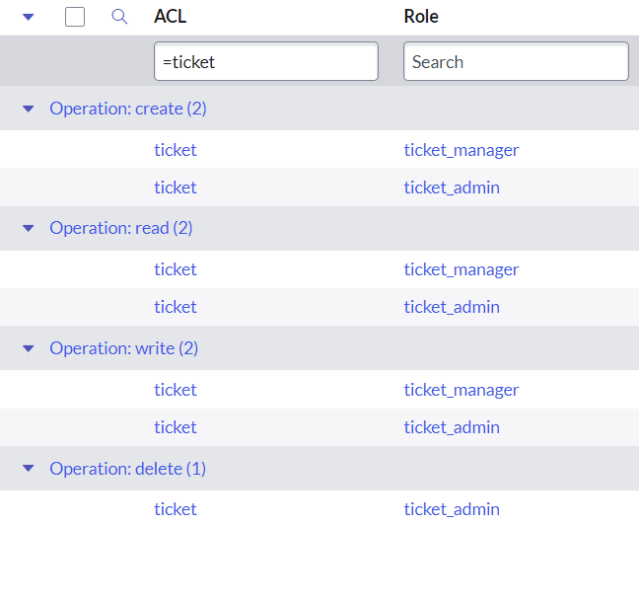
As a matter of fact, in the TEST instance, all 7 ACLs will use the same role, namely the new ticket_manager role from Update_Set_3:

D E V

T E S T
Obviously, ACLs from Update_Set_1 and Update_Set_2 got associated with a wrong role in the TEST instance. But how come? In all ACLs in our example, roles were added via a reference field in the embedded list, and references don’t break when you rename the referenced record. If you rename a Group, for instance, all its tasks will remain assigned to it.
Moreover, at the time of deployment of Update_Set_2, ticket_admin role referenced in the Access Role [sys_security_acl_role] entry of the delete ACL did not exist in the TEST instance at all. So why did it not result in a warning when the update set was being previewed?
I think it’s time to shed some light on this unusual phenomenon.
It turns out, when updates are committed, not all referenced records are matched by sys_id. For some tables, other attributes (or even combinations of multiple attributes) are used to find a match. This is great for records that may have been created independently in different instances and therefore have different sys_id values (for example, some system properties that are implicitly present in the system without an entry in [sys_properties] table and are only created when their default value needs to be changed). However, in situations like ours, this can yield unexpected results if you don’t pay close attention to dependencies and lack governance around your update sets.
On the technical level, this magic is achieved by including extra attributes into the XML payload of the customer update. In our example, the system relied on the name attribute and therefore matched the new ticket_manager role even though it had a sys_id different from the one that had been recorded in the payload of the Access Role [sys_security_acl_role] record:

It is worth noting that this special logic does not only apply to roles. There are a number of other entities you need to be careful with, including user groups, field labels, and UI messages, to name a few. If you want to learn more about this tricky topic, I suggest you read this article from the product documentation carefully. Except maybe the last sentence, which (as you already know from my previous post) doesn’t hold.
https://sys.properties/2024/10/09/the-unmatched-sys_id/