
Service Operations Workspace - How to edit "Overview" section on a change record?
 New article articles in ServiceNow Community
·
Apr 27, 2025
·
article
New article articles in ServiceNow Community
·
Apr 27, 2025
·
article
 Sujatha V M
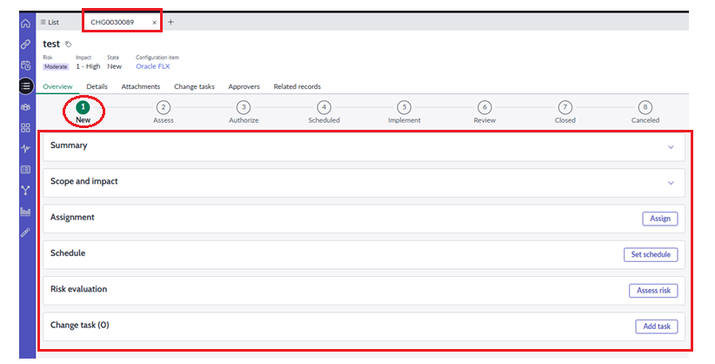
In this article, we will see how we can "Edit" the overview section on a change record.
By default, the section provides the below details and it differs based on the state of the record.
Lets consider the change record which is in "New" state,

➡️ Navigate to Change -> Overview -> Workspace Configuration and select the section which you would like to configure according.

➡️ Let's access the "Change Overview Container State : New" record from Overview Container section. This record holds the "Change Overview Cards" related list.

Note: Application scope differs. In case of any customizations, kindly make sure the scope is appropriate.
➡️ Before submission of the change record, the overview section displays only the "Summary" card because by default the value of "Display for new record" is set to "True" whereas for other cards its set to "False".


Note: In case of any issues with "Risk Evaluation" card, please repair the "Change - Risk Assessment" plugin.
➡️ In order to modify the contents within "Summary" section, navigate to "SOW-Change-Overview" view.

Now from the form layout and section, we can add/remove the fields from the form.

Kindly hit "Helpful" if it was helpful for your needs!!!!
ServiceNow #ServiceOperationsWorkspace #ServiceNowCommunity #HappyLearning
https://www.servicenow.com/community/service-operations-workspace/service-operations-workspace-how-to-edit-quot-overview-quot/ta-p/3248519