
ITSM change management tow levels of approval using approval policy and flow designer
 New article articles in ServiceNow Community
·
Apr 22, 2025
·
article
New article articles in ServiceNow Community
·
Apr 22, 2025
·
article
 VaranAwesomenow
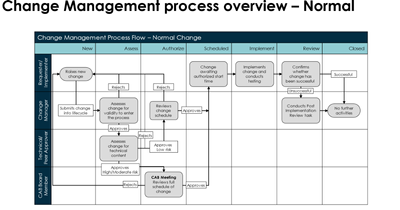
This article is to implement two levels of approval sequentially during authorize phase for a change request as part of change management process.
Code : anilvaranasi/Custom-CHG-Approval
Normal change management process flow as per ServiceNow best practices provided in nowcreate process guide. I have added some now create content screenshots to set the context and background on what is offered OOB and how to implement this requirement of multiple sequential approvals. Actual solution details are covered as we navigate along the article.


Implement Business owner and IT owner approval as sequential approvals
Change requests should go through two levels of approval sequentially during Authorize state, first level will be IT application owner, and second level will be application platform owner.

Customization needed: Create following objects meet this requirement
- Deactivate OOB flow -> Change - Normal – Authorize
- Create new flow -> Change - Normal - Authorize Two Level Approval
- Deactivate OOB approval policy , policy decision -> Requires CAB Approval
- Create two new answers
- Change Approval Definition: Authorize Platform owner Approval
- Change Approval Definition: Authorize Application owner Approval
- Create two new policy decisions
- Requires Application Owner Approval and associate answer as Change Approval Definition: Authorize Application owner Approval
- Requires Platform Owner Approval and associate answer as Change Approval Definition: Authorize Platform owner Approval


Once above setup is complete on a given change request when the state is in authorize, two levels of approval will get triggered sequentially, first level approval will be application owner and second level approval will be platform owner.
Testing
Test Service AMEA Customer Portal, where Level1 -> IT application owner -> Managed by -> Abraham Lincoln and Level2 -> Platform owner -> owned by -> Abel Tuter

Create new change with service as test service

Request approval on assess state approvals get set to assignment group (this is OOB no change is done)

Approve the change request.
Once change moves to authorize then level1 (IT application owner , Abraham Lincoln approval will be triggered)

Once approved as Abraham Lincoln, second level approval Platform owner -> owned by -> Abel Tuter is triggered

Once approved change moves to scheduled state

Below is the flow execution for above change

https://www.servicenow.com/community/developer-articles/itsm-change-management-tow-levels-of-approval-using-approval/ta-p/3243724