
Service Operations Workspace - How to modify the parameter on the "Record Information" section?
 New article articles in ServiceNow Community
·
Apr 16, 2025
·
article
New article articles in ServiceNow Community
·
Apr 16, 2025
·
article
 Sujatha V M
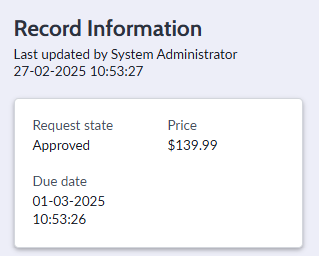
In this article, we will see how we can modify the parameters of request record information section.
By default, the section provides the below details,

Now let's hide the "Price" parameter on this card.
➡️Navigate to the Data Broker Server Script [sys_ux_data_broker_transform.LIST] and search for the Record Information - Request script.

➡️ A script include "RequestInfo" is used which in turn calls the "RequestInfoSNC" and inside the "getFieldsInfo" function holds those values.
Note: Both the script includes are read-only type.
RequestInfo Script Include :

RequestInfoSNC Script Include:

KINDLY DO NOT USE INSERT AND STAY OPTION ON READ ONLY FILES.
You might need to create a customized script includes and call the customized one on the data broker script for your requirement under the required scope with same details.
Below is the script where the "Price" parameter is removed.

RESULT:
Post changes the request record displays as below,

Kindly hit "Helpful" if it was helpful for your needs!!!!
ServiceNow #ServiceOperationsWorkspace #ServiceNowCommunity #HappyLearning
https://www.servicenow.com/community/service-operations-workspace/service-operations-workspace-how-to-modify-the-parameter-on-the/ta-p/3239833