
ServiceNow Flow Designer: Adding Record Link in "Send Email" flow action
 New article articles in ServiceNow Community
·
Apr 04, 2025
·
article
New article articles in ServiceNow Community
·
Apr 04, 2025
·
article
 Ankur Bawiskar
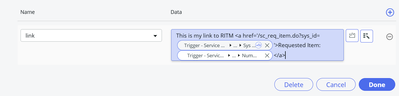
In ServiceNow's Flow Designer, there are often scenarios where you need to include a link to a specific record within an email. However, when using the Send Email flow action, this isn't directly possible. Here’s a simple yet effective workaround to achieve this:
Workaround Steps:
- Create a Flow Variable: Start by creating a new flow variable of type String. This variable will hold the URL of the record you want to link to.
- Set Flow Variables: Use the Set Flow Variables flow logic to populate the string variable with the desired URL. You can construct the URL using the record's sys_id or other identifiers.
- Include in Email Body: Finally, incorporate the flow variable into the body of your email. This will allow recipients to click directly on the link and access the relevant record.


Output:
1) Flow Variable

2) Email link

View original source
https://www.servicenow.com/community/workflow-automation-articles/servicenow-flow-designer-adding-record-link-in-quot-send-email/ta-p/3228211