
Types of Services CSDM
 New article articles in ServiceNow Community
·
Apr 02, 2025
·
article
New article articles in ServiceNow Community
·
Apr 02, 2025
·
article
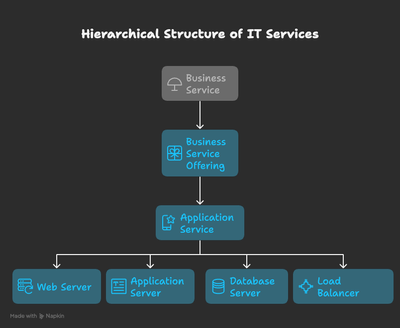
Service Overview
Business Service:
A Business Service represents work or goods that are supported by an IT infrastructure. Within ServiceNow, Business Services are categorized into various types, including Business Service, Technical Service, Service Offering, Shared Service, Application Service, and Billable Service.
Business Services of Type "Business Service"
These are the most abstract and represent the highest level within your Configuration Management Database (CMDB). The key focus when defining these services should be from the customer’s perspective, not from the IT viewpoint. What do customers call the services they consume? It’s crucial to ask users to describe the services they interact with daily. You’ll likely hear terms like “Email,” “Purchasing,” “Marketing,” “Computing,” “Telephony,” and “Finance.” These terms often mix departments and services, which is acceptable, as the goal is to minimize communication time regarding the state of these services. This allows users to quickly report issues to the service desk.
It’s vital to engage with your user community when defining Business Services. If you approach this solely from an IT perspective, you risk missing the full value of a service-aware CMDB. By understanding how your users perceive services, you align IT offerings with business needs and improve overall communication.
Technical Service:
Technical Services are the IT infrastructure and systems that IT operations teams support. Examples include Active Directory (AD), Exchange, antivirus software, and other core IT services. In the context of IT Operations Management (ITOM), a set of web servers or Linux servers may also be considered a technical service. Technical Services are typically associated with service owners and are often foundational, providing underlying support for Business or Application Services.
Application Service:
An Application Service represents a logical representation of an application stack in use. Application Services can be either internal (e.g., an organization's email system) or external-facing (e.g., an organization's website). For example, generating financial reports through a web-based application requires a variety of components such as computers, web servers, application servers, databases, middleware, and network infrastructure. All these elements work together to deliver the financial reporting service.
In development environments, Application Services are used to represent different instances of a business application or system across various environments, such as development, test, and production. Application Services are crucial entry points for Service Mapping, as they help map and visualize the flow and relationships between different infrastructure components and business services.
This structured approach to categorizing services within ServiceNow ensures that your CMDB is not only accurate but also aligned with user expectations, improving both service delivery and incident management. Engaging with users to identify how they perceive and consume services ensures that the services you define reflect actual business needs and priorities.
Service Offering: A Service Offering is a specific, consumable aspect or variant of a Business Service, designed to meet particular needs or business requirements. While a Business Service represents a high-level view of services delivered to users, a Service Offering provides more detailed, tangible components of that service. It may include features, capabilities, or configurations that are part of a broader business service.
For example, a Business Service could be “Email,” while specific Service Offerings within that business service might include "Exchange Email," "Mobile Email," or "Webmail Access." Service Offerings allow organizations to define and manage the exact services provided to end-users, with clear definitions around availability, support levels, and specific configurations. Service Offerings are integral to ensuring that the organization can deliver and manage a range of service types under a broader business service, ensuring alignment with both user needs and operational capabilities.
This structured approach to categorizing services within ServiceNow ensures that your CMDB is not only accurate but also aligned with user expectations, improving both service delivery and incident management. Engaging with users to identify how they perceive and consume services ensures that the services you define reflect actual business needs and priorities.
Example:
- Business Service: Financial Reporting
- Business Service Offering: Web-Based Financial Reporting
- Application Service: Financial Reporting Application
- Technical Service: Web Server
- Application Server
- Database Server
- Network Infrastructure

A Dynamic CI Group is a dynamic collection of Configuration Items (CIs) that are grouped based on specific, common criteria. For example, you can create a dynamic CI group to include all web servers located in Detroit or all Oracle databases located in Boston.
Dynamic CI groups are highly beneficial in various situations, including:
- As a Query-Based Application Service: If Service Mapping is not yet enabled, you can utilize a Dynamic CI group to represent an application service. For instance, if you have multiple servers and database instances in a service such as MyAppServiceProd, you can replace manual spreadsheets with a Dynamic CI group, streamlining your service management.
- As a Managed Group of Infrastructure CIs: If you are managing infrastructure CIs for specific locations or services, such as the web servers in Detroit being managed under the DetroitRockCity Technical
- A Dynamic CI group eliminates the need to manually create relationships between Technical Service Offerings and Infrastructure CIs. Instead, a single relationship from your Technical Service Offering CI (e.g., DetroitRockCity) to the Dynamic CI Group (e.g., web servers in Detroit) provides the necessary visibility.
- To Manage Patches for CIs: In Change Management, a Dynamic CI group can be selected to represent the CIs that need to be updated. By using business rules, the Affected CI field can be automatically populated, streamlining patch management for large numbers of CIs.
By leveraging Dynamic CI Groups, organizations can automate and streamline their CI management, reduce manual errors, and improve visibility and efficiency across their infrastructure.
https://www.servicenow.com/community/cmdb-articles/types-of-services-csdm/ta-p/3225320