
How to Hide Unchecked Checkbox Variables on the Ticket Page
 New article articles in ServiceNow Community
·
Mar 28, 2025
·
article
New article articles in ServiceNow Community
·
Mar 28, 2025
·
article
 Ankur Bawiskar
Often, we encounter checkbox variables on our catalog items that may not be filled in. Despite being unchecked, these variables are still displayed on the ticket page. Customers might request to hide these variables when they have a false value. Here’s how you can achieve this:
- Create a Copy of the Widget "Variable Summarizer":
- Start by cloning the existing "Variable Summarizer" widget.
- Update the Standard Ticket Config Record:
- In the Standard Ticket Config record, set the Type to Custom and populate it with the newly created widget.
- Modify the Widget Server-Side Code:
- Update the server-side code of the widget to handle the specific variable type, ensuring that unchecked checkbox variables are hidden.
Widget Server code:
Server Script: Changes made here
(function() {
    data.label = options.label || gs.getMessage("Options");
    if (options.task)
        data.ariaLabel = gs.getMessage("{0} for {1}", [data.label, options.task]);
    else
        data.ariaLabel = data.label;
    if (options.variables) {
        data.variables = filterVariables(options.variables);
        return;
    }
    data.labelClose = gs.getMessage("Close");
    var tableName = options.table || $sp.getParameter('table');
    var sysId = options.sys_id || $sp.getParameter('sys_id');

    if (!new global.SPWidgetAccessControl().hasPublicAccess(tableName, $sp, options, input)) {
        gs.warn("Deny access to table which is not public: " + tableName);
        data.isValid = false;
        return;
    }

    var record = sn_std_tkt_api.TicketConfig.getTicketRecord(tableName, sysId);

    if (record == null)
        return;

    data.canRead = record.canRead();
    if (!data.canRead)
        return;

    data.variables = filterVariables(new GlobalServiceCatalogUtil().getVariablesForTask(record, true));

})();

function filterVariables(variables) {
    if (variables == null || variables.length == 0)
        return variables;

    var filteredVariables = [];
    variables.forEach(function(variable) {

        if (variable.visible_summary) {
            // push the variable only when it's checkbox and true
            if (variable.type.toString() == '7' && variable.display_value.toString() == 'true')
                filteredVariables.push(variable);
            else if (variable.type.toString() != '7') // push all other variables as it is
                filteredVariables.push(variable);
        }

    });

    return filteredVariables;
}
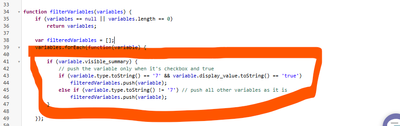
Server Side Script Highlighted: Push checkbox variable type only when value is true

RITM has Unchecked variable in variable editor

Unchecked variable is hidden on portal:

Standard ticket config record:

View original source
https://www.servicenow.com/community/workflow-automation-articles/how-to-hide-unchecked-checkbox-variables-on-the-ticket-page/ta-p/3221338