
Building agent work schedules and providing data via integration
 New article articles in ServiceNow Community
·
Mar 11, 2025
·
article
New article articles in ServiceNow Community
·
Mar 11, 2025
·
article
Introduction
Within FSM, work schedules for agents are one of the key foundational data that support scheduling. Work schedules define, within certain periods, the exact times agents are available - or unavailable to work. They can contain sub-schedules, default working hours, holidays, personal events and other information.
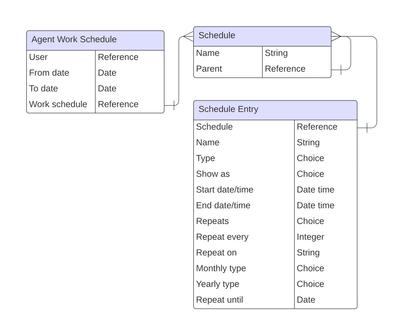
This article clarifies their data model, and how an integration could leverage that to provide this information from an external system.
Data model

Agent Work Schedules [agent_work_schedule]
Our first table is Agent Work Schedules [agent_work_schedule], which contains a date range (in the form of From Date and To Date fields), a reference to a user, and a reference to a Schedule [cmn_schedule].
This is pretty self-explanatory: each agent can have one or more entries in this table, with non-overlapping range dates. Using different date ranges it is possible to set completely different schedules for agents during different periods. This could be an option to switch between two clearly defined alternating rotations. However, it is also possible to set different rotations and/or different schedules by making child schedules within a single parent schedule, which is a good practice. This keeps a 1:1 relationship between an agent and a single Agent Work Schedule and flattens the complexity down to the Schedule level, where that complexity already existed, therefore reducing one layer of complexity.
Agent Personal Schedules [agent_events]
Similar to the above table, this is a table linking User records to specific Schedules for Personal Events. Each agent will have a Personal Events schedule automatically created for them once they obtain the wm_agent role in this table. This links a user to a Schedule entry, and contains schedule entries such as PTO, sick time, trainings or other personal events.
Schedule [cmn_schedule]
Schedules (and corresponding schedule entries) follow the normal platform core functionality, and it is recommended to read the official documentation pages such as Define a schedule, Schedule Fields and Schedule entry fields
.
However it is good to understand that schedules can be linked together using Child Schedules [cmn_other_schedule]. As per the best practice defined in the section above, it is good to have a single "Work Schedule" for each agent, which can then contain a set of child schedules such as Holidays, Working hours (following specific rotations if desired) and so forth.
The Personal Events schedule should not be contained as a child schedule, as that follows a different process technically.
Some schedules are provided out of the box, like 24x7, Weekdays, Weekdays excluding holidays and so forth.
Schedules can have a Type which can be set to "Blackout" in order to indicate that this schedule is used to indicate when scheduling can NOT happen. For more information, see also my other article on defining Access hours within FSM, which follows the same schedule definition logic. In that case, its Schedule Entries should have Show as = Busy and Type = Excluded (see next section), such as in the OOTB schedule "U.S. Holidays".
In summary, it is a good practice to build a composite Work schedule by having a single parent which can have child schedules, such as rotations and holidays. In addition, a separate Personal Schedule exists containing personalized events for non-availability.
Schedule Entry [cmn_schedule_span]
Schedule Entries are the individual items in a schedule that contain the data about when agents can actually work and not.
The best practice to indicate when an agent can be scheduled during this period is to have an event with Show as = Free or On call. In order to indicate non-availability, use Show as = Busy and Type = Excluded.
Furthermore, by using the fields When, Repeats, Repeat every, Repeat on, and so forth, the cadence can be defined. See the definitions here.
For integration purposes, it is recommended to check the Dictionary of the cmn_schedule_span table in order to understand the actual state of the instance that is being integrated against. However, some OOTB values (as of writing) are defined in the table below:
| Table | Field | Value | Label |
|---|---|---|---|
| Schedule Entry | Type | time_off | Time off |
| Schedule Entry | Type | appointment | Appointment |
| Schedule Entry | Type | meeting | Meeting |
| Schedule Entry | Type | call | Call |
| Schedule Entry | Type | exclude | Exclude |
| Schedule Entry | Type | on_call | On call |
| Schedule Entry | Type | time_off_in_approval | Time off - In approval |
| Schedule Entry | Type | time_off_rejected | Time off - rejected |
| Schedule Entry | Show as | busy | Busy |
| Schedule Entry | Show as | free | Free |
| Schedule Entry | Show as | tentative | Tentative |
| Schedule Entry | Show as | on_call | On-call |
| Schedule Entry | Repeats | (empty) | Does not repeat |
| Schedule Entry | Repeats | daily | Daily |
| Schedule Entry | Repeats | weekdays | Every weekday (Mon-Fri) |
| Schedule Entry | Repeats | weekends | Every weekend (Sat, Sun) |
| Schedule Entry | Repeats | weekMMF | Every Mon, Wed, Fri |
| Schedule Entry | Repeats | weekTT | Every Tue, Thu |
| Schedule Entry | Repeats | weekly | Weekly |
| Schedule Entry | Repeats | monthly | Monthly |
| Schedule Entry | Repeats | yearly | Yearly |
| Schedule Entry | Repeats | specific | Specific |
| Schedule Entry | Monthly type | dom | Day of the month |
| Schedule Entry | Monthly type | dow | Days of the week |
| Schedule Entry | Monthly type | ldom | Last day of the month |
| Schedule Entry | Monthly type | lwdom | Last week day of the month |
| Schedule Entry | Yearly type | doy | Day of the year |
| Schedule Entry | Yearly type | float | Floating |
Integrating
Tying it all together, in order to integrate work schedules from an external system, we need to design some way to incorporate the data according to the above data model.
Depending on the method of integration, we can envision a design using a staging table with a transform map. This would take in some source object from the system of record and transform it to the above structure. This staging table could be populated via a Scripted Endpoint, a flow in Flow Designer via IntegrationHub, a data source that is pulled periodically, or any other method.
It is difficult to come up with exact scenarios here, as each integration is different. However, the approach would be the same: populate a staging table from the integration using normal integration methods, then map to the above data model.
As always - as the ServiceNow platform is ever evolving and also subject to configuration and customization, it is prudent not to take the above data model examples exactly as-is. Please take note of the latest documentation and changes made to the instance in order to tailor to the exact requirements and circumstances.
Conclusion
In conclusion, it is possible to build agent work schedules via schedule entries that are defined in various schedules. We can set standard work schedules and structural and incidental non-availabilities. Via normal methods, we can populate this data via integration.
I hope this article has proven valuable and happy building!
https://www.servicenow.com/community/fsm-articles/building-agent-work-schedules-and-providing-data-via-integration/ta-p/3202655