
Configuring custom financial planning attributes to categorise labor costs based on the RAs
 New article articles in ServiceNow Community
·
Nov 06, 2024
·
article
New article articles in ServiceNow Community
·
Nov 06, 2024
·
article
The new attribute based resource assignments and financial planning enables customers to define attributes on the resource assignments and automatically create cost plans categorised by the attributes selected on the resource assignments.
This will help customers to avoid heavy customisations to populate attributes from the resource plans on the cost plans and enable them to achieve the financial tracking of labor costs using out of box configurations.
Let's see an example of how to achieve this for a custom attribute named 'cost category':
Assume that you want to categorise resource assignments by a certain attribute named ‘Cost category’ so that their costs are automatically broken down by the values of this attribute.
Following steps can be followed by the ServiceNow administrator to setup this attribute to be visible against the resource assignment record so that the respective values can be selected while assigning resources. And then labor costs will be generated based on the resource assignments and their respective cost categories.
Multiple attributes can be setup in similar way so that labor cost plans will be created for the combination of values from such attribute.
Steps to follow:
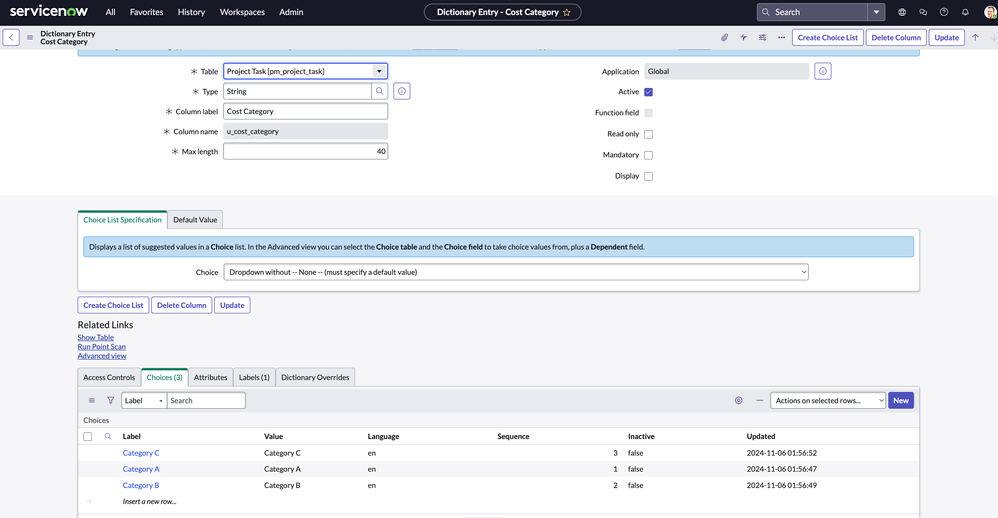
Add the attribute on the task tables like dmn_demand, pm_project or pm_project_task on which resource assignments will be created, as a new column.
Add the attribute on the following tables which are related to resource assignments and financials as a new column:
- resource_allocation
- cost_plan
- sn_plng_att_core_resource_assignment
- resource_allocation
Create a new planning attribute record in 'Planning Attributes' (sn_plng_att_core_planning_attribute) list, mapping the attribute from the task table with the financial and resource tables and enabling it as a financials attribute for generating labor costs.


- Update the ‘Project Workspace’ view of the ‘Resource Assignments’ platform list to make the new financial attribute visible for the users to select it while creating resource assignments on the project workspace.

- Update the ‘Financials view’ view of the cost plans platform list to make the new financial attribute visible for the users in the financials page of the project workspace.

Usage:
Now the users will be able to categorize Resource assignments by the new ‘Cost Category’ field and labor cost plans will be generated automatically by the cost category values of the resources assigned.
Demo:
- User opens a project in the new project workspace and assigns resources and selects ‘cost category’ values against the resource assignments:

- User navigates to Financials page of the project and generates labor costs. Cost plans are created by the respective cost categories selected against the resource assignments as follows:

What attributes would your organization like to track the labor costs using this new capability in ServiceNow SPM? Please mention in the comments below.
https://www.servicenow.com/community/spm-articles/configuring-custom-financial-planning-attributes-to-categorise/ta-p/3097645