
How to Filter a List When You Can't Correctly Build the Filter
 New article articles in ServiceNow Community
·
Feb 25, 2025
·
article
New article articles in ServiceNow Community
·
Feb 25, 2025
·
article
The Issue:
Sometimes you can't include the condition you want in a graphical list filter, but a (GlideRecord) encoded query is valid.
An Example:
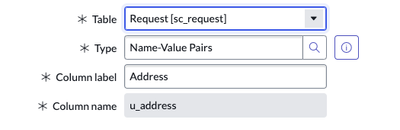
On my sc_request table I have created a field with the type Name-Value Pairs to store address information that will accommodate varying global formats (dynamic content and number of fields).

This field type allows you to add as many pairs as needed to each record. Here's what it looks like on the form when populating the field for a simple US address:

The value of this field is stored in JSON, containing the Name and Value of each pair added:
{"Street":"123 Main St","City":"MyCity","State":"MyState","Zip":"90210"}
Business Case:
If I need to find all of the Request records that contain a certain City name, Zip Code, Street name or address etc., I cannot do so in a list view of the Request table, as the only conditions available are 'is', 'is not', or 'is anything':

It's definitely worth questioning at this point why 'contains' does not appear for this field type, but for now this is a system limitation. There are probably other useful conditions missing for various field types.
In a script, I can get the records I'm looking for via GlideRecord using an encoded query. As a simple example, let's say I want to retrieve all of the records that contain 'Main St':
'u_addressLIKEmain st'
The Workaround:
By adding a sysparm_query to the URL, the list will be filtered appropriately. The above encoded query resolves like this when added to the end of a URL:
When doing this, you will see the correct filter reflected in the breadcrumb:

But here is the best part - now when you expand the filter via the funnel icon, 'contains' is a valid operator, so you can change the text/value to whatever else you are looking for!

While this is a simple example, passing in a complex encoded query with ANDs and ORs will also work to filter the records and update the filter where building the filter manually is limited.
https://www.servicenow.com/community/now-platform-articles/how-to-filter-a-list-when-you-can-t-correctly-build-the-filter/ta-p/3188442