
Quick Guide: Requesting resources from a Group/Role/Skill with Resource Assignment
 New article articles in ServiceNow Community
·
Feb 20, 2025
·
article
New article articles in ServiceNow Community
·
Feb 20, 2025
·
article
In this use case, we are considering what seems to be a very common use case:
As a Demand/Project Manager or other requestor, i need a resource or resources for NNN hours from Group "A". A Resource Manager will make the determination of exactly who will be assigned.
It is not entirely obvious how to do this with Resource Assignment. The requestor knows they need somebody from a Group (Role and/or Skill can be included as well or inplace of... ) for a number of hour/FTE/Person days but they dont know or don't care who is assigned. Just give me a resource !!!
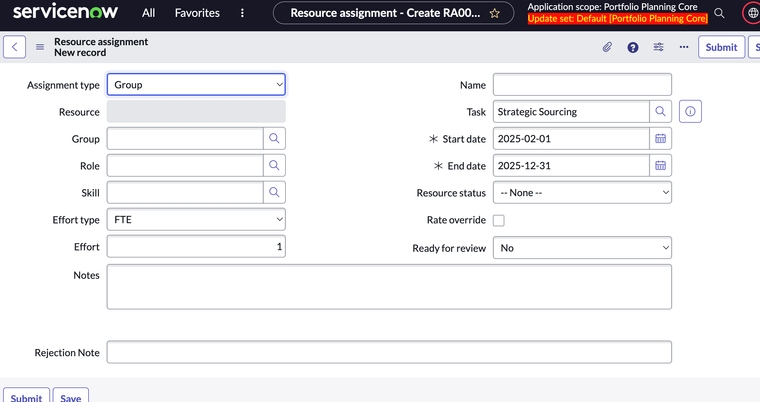
Don't use Group Assignment Type unless you want all members
Group is especially confusing here because we have a Resource Assignment type called Group. Do not use the Group type for this use case. It will assign all members of the group by creating individual User Resoruce assignments for each member of the group!

In Project Workspace this would be equivalent to specifying a Group in the Resource or specifying group in the Resource Assignments column

Use a User Type Assignment
What you want to do is simply specify the Group you want in the Group column/attribut, the amount of hours/FTE/Person Days and the time frame desired. Do not specify a Resource. This results in a single Resource ASsignment record that is Unassigned but the request hours are captured against Group (Role/Skill).


The Unassigned Resource request is now visible in Resource management workspace and can be assigned to a member or members of the group requested and the Assignments Approved.

https://www.servicenow.com/community/spm-articles/quick-guide-requesting-resources-from-a-group-role-skill-with/ta-p/3184242