
Creator Studio for Admins
 New article articles in ServiceNow Community
·
Sep 24, 2024
·
article
New article articles in ServiceNow Community
·
Sep 24, 2024
·
article
As a former developer and implementer of the platform, I’ve been there.
Trying to understanding a new tool and how it bring value to the dev process, but not knowing how to jump straight into meaningful configuration, who has time to dig?
This blog series Creator Studio for Administrators is intend to act as that sign-post, giving you directions for you to get yourself started in configuring Creator Studio so that it fits your company, your process, and lets your business experts develop apps that fit into your application development.
Using Catalog Templates
Today we’re going to be creating a Record Producer template to use in Creator Studio.Part of using new tools on our platform, like Creator Studio, is learning when to use existing tools and capabilities to ensure that this new tool integrates into your workflow.
As an admin looking to bring new line of business users into your app dev, you’ll likely want to ensure that groups can leverage department specific questions, default categories, or limit a template to specific users.
By creating catalog templates, you can streamline and curate this process for your Creator Studio users, and let them get into building out their logic.
We will be using a platform capability Catalog Builder, to create that template, which can then be used by your Creator Studio users.
App Build: TLDR
For those of you that want the quick and dirty without the narrative, these are the steps we'll be covering in this build out:
- Create User Criteria record (user_criteria)
- Create Record Producer template (sc_template)
- Areas of optional configuration: add question sets, set location
- Don't: Set destination table
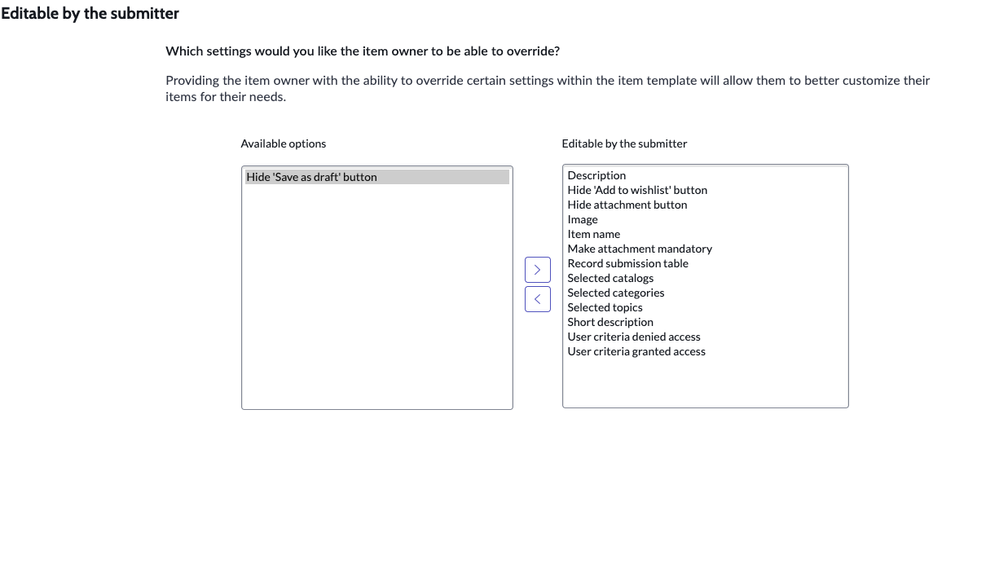
- Do: Set default overrides
- | Selected catalogs |
| --------------------------------- |
| Description |
| Selected topics |
| Image |
| User criteria denied access |
| Record submission table |
| User criteria granted access |
| Selected categories |
| Hide 'Add to wishlist' button |
| Make attachment mandatory |
| Hide attachment button |
| Short description |
| Item name |
- | Selected catalogs |
- Areas of optional configuration: add question sets, set location
- Submit
App Scenario
Jen is a ServiceNow platform admin at HarvestLynx, an online grocer.
HarvestLynx has access to Creator Studio as part of their App Engine Enterprise license.
Jen installed Creator Studio following the Washington Store 2 release, she’s had a chance to play around Creator Studio and really enjoys the simplified app building and maintenance.
Citizen development at HarvestLynx currently is comprised of a core low-code app dev team including Jen, several specific groups (HR, Finance) and a catalog building SWAT team.
Jen would like to integrate Creator Studio into the catalog building SWAT teams workflow, but in order to do so, she will need to ensure that the catalog building team has their own app template.
Configuring user criteria
In order to get started, Jen wants to ensure that only the catalog team will be able to access this template, as their lead, Ashiq has question sets he'd like to include, and will be modifying their process over the next few months.
Jen will be configuring some user criteria to apply.


From the User Criteria list, we select "New" and create a new User Criteria record, giving it a meaningful name, in this case, Jen names the group "CS Catalog Team"

Jen assigns 3 of her other app dev admins(Beth, Abel and Howard) as users of the Catalog team, she also adds in the Catalog Maint team user group to the criteria record, granting access.
Configuring Catalog Template


Jen assigns a Template name, a Short description, and in the Template available for section, she selects Browse, and then selects the User Criteria she created earlier, ensuring this template will display only to the catalog team.

Now Jen can start configuring how she wants the template to work and look. Here Jen can choose if she wants to include a default question set that will be made available for Ashiq and the catalog team. For now she's leaving it blank, but Ashiq can change this later.
These catalog items will be available to all users, but if needed, User Criteria could be applied on the Access tab to target specific user groups
The important step for making this Record Producer accessible to work is for Jen to add the following on the Overrides tab
| Selected catalogs |
|---|
| Description |
| Selected topics |
| Image |
| User criteria denied access |
| Record submission table |
| User criteria granted access |
| Selected categories |
| Hide 'Add to wishlist' button |
| Make attachment mandatory |
| Hide attachment button |
| Short description |
| Item name |

These override items are the restrictions applied to the application that will be created by Creator Studio users leveraging this custom template.

Using the template
Beth is a developer on Ashiq's team, she's received notification that a new app template has been created for her team to use inside Creator Studio.


Beth logs into the platform, and opens Creator Studio.

Beth has full access inside Creator Studio, so she creates a new app from the landing screen.

From the template list, Beth sees that the new CS Catalog Team template is available to use with her new app.
Wrap up
I want to thank you for joining me on walking through this scenario to help unpack a common scenario you may face as an admin looking to integrate Creator Studio into your existing application development.
Over the next few weeks, we'll be releasing more blogs, and videos that will give you real life step-by-step methods, scenarios and use cases to help you accelerate your app dev efforts andclear your backlog, by using the power of Creator Studio.
https://www.servicenow.com/community/creator-studio-blogs/creator-studio-for-admins/ba-p/3053357