
TMF 641 Service Order Outbound Fulfillment Request Configuration
 New article articles in ServiceNow Community
·
Jan 30, 2025
·
article
New article articles in ServiceNow Community
·
Jan 30, 2025
·
article
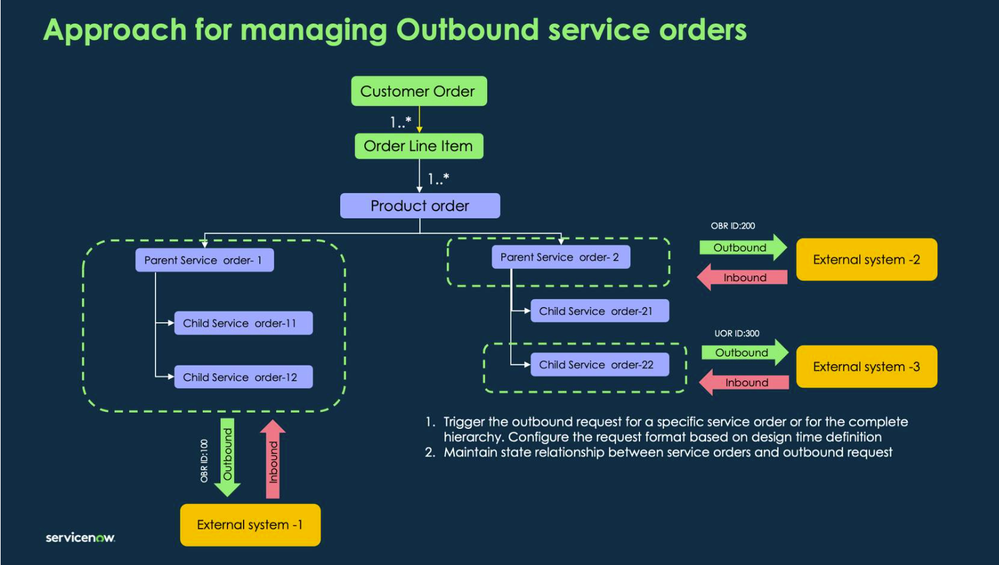
As you might know ServiceNow Order Management for Telecom app can act as COM, SOM or both. In any of these case, there might
be a requirement to send out Service Order from ServiceNow to another service order fulfillment system or publish events to
messaging platforms for consumers. This article attempts to detail on how to make use the Outbound Fulfillment Request feature
available out of the box this purpose!
Here is an high-level overview of Outbound Fulfillment Request.

From the above, while its clear that the out of the box app provide options to configure multiple external system depending on the
requirement, there is limited documentation available on how to configure the same.
This article attempts to explain and provide step by step instruction on how to configure and customize the out of the box support
for Outbound Fulfillment Request.
Below is a image explaining what all things happen behind the scene to get achieve this.

Now lets look at "Execute Integration request" action in the Initiate External Fulfillment subflow.

This action defines the request type that need to be invoked and set the input parameters value.
These input parameters and their values will be available for the request adaptor sublfow to work on.
You can find these inputs defined in the Integration Request Type

There might be use cases where you want to pass additional input values for the request adaptor subflow. The option explain below
can be used when you want to add field at the Request Type level , meaning if all the integration definition need access to the
additional input, then you can do so by
Defining the new field and value in the inputMap in input parameters of Execute integration request action.
Adding a new Integration request inputs in Integration request type Service Order Outbound Request record. Please note that column name will be auto prefixed with 'u_'
Defining the same field in the inputs for the subflow:


You can see the complete json object with new custom field added to the input as below :

Now lets look at Integration request definitions for each external systems.

You can define the Selection condition to configure different Request Adaptor Subflow as per your use case. In the above example, you can see:
- If the service specification is Network Interface Profile Service, then execute the subflow: "Send To External System 1 subflow"which will have the logic to send the request to External System 1.
- If the service specification is EVC Configuration Service, there are two records, one for sending it to External System 2 and one for sending it to External system 3,
- Record with lowest Order value (high priority) will be selected and "Send To External System 2 subflow" will be executed.
Finally, If you are familiar with TMF API implementation and details matter, you are less likely to appreciate the ServiceNow out of the box TMF641 payload. Highlighted few that I am personally concerned about:

Here is how you can correct these by customizing the script include implementation.
DomainOrderUtil is the script include that you can use to override few of the functions that generate this payload: addServiceOrderItemObj, addServiceDetails and addSpecificationDetails
Here is the final scrip include
var DomainOrderUtil = Class.create();
DomainOrderUtil.prototype = Object.extendsObject(DomainOrderUtilOOB, {
// Define overriding functions here
addServiceOrderItemObj: function(domainItemGR) {
//filling details common to both domain order and composedof item
var serviceOrderItemObj = {};
serviceOrderItemObj.id = domainItemGR.getValue('sys_id');
serviceOrderItemObj.action = domainItemGR.getValue('action');
// Removing this field as its not required in my use case.
// serviceOrderItemObj.revision_operation = domainItemGR.getValue('revision_operation');
serviceOrderItemObj.service = this.addServiceDetails(domainItemGR);
//filling details as per difference between domain order and composedof item
this.addDomainOrderOrComposedofInfo(domainItemGR, serviceOrderItemObj);
return serviceOrderItemObj;
},
addServiceDetails: function(domainItemGR) {
var service = new Object();
service.id = domainItemGR.getValue('product_inventory');
//spec details
if (!gs.nil(domainItemGR.specification)) {
var specGR = domainItemGR.specification.getRefRecord();
service.serviceSpecification = this.addSpecificationDetails(specGR);
// service['@type'] = specGR.getValue("specification_type");
// Correcting the @type for service class.
service['@type'] = "Service";
}
return service;
//since this method is processed for both domain_order and composedof_item,
//remaining sevice obj details like service.serviceRelationship, service.serviceCharacteristic are filled in addServiceOrderItemObj
},
addSpecificationDetails: function(specGR) {
var serviceSpecification = new Object();
serviceSpecification.name = specGR.getValue("name");
serviceSpecification.id = gs.nil(specGR.getValue("external_id")) ? specGR.getValue("initial_version") : specGR.getValue("external_id");
// Commenting these fields as they are not required in my use case!
// serviceSpecification.internalVersion = specGR.getValue("version");
// serviceSpecification.internalId = specGR.getValue("initial_version");
return serviceSpecification;
},
type: 'DomainOrderUtil'
});
https://www.servicenow.com/community/telecom-articles/tmf-641-service-order-outbound-fulfillment-request-configuration/ta-p/3164468