
Improving Performance on Older Instances with Table Rotation
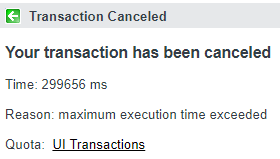
If your instance has been around for a while, you've probably built up a few tables that are quite extensive. The good news is - there are steps that you can take to both mitigate, and even preemptively prevent this issue.
"Table Rotations Groups" are a little-known feature that allows you to split very large tables into manageable chunks. There are two types of table rotation groups: Rotation, and Extension. What we're going to use today, is an extension type. This means that every so often, the table you're rotating will be extended, and all new data will go into the new extended table.
There are specific use-cases for each table rotation group type. Extension is best for when a table is queried by the sys_created_on field often, but you need to retain all historical data. Rotation on the other hand, sets up a specified number of tables to rotate through using, for a specified period of time each - but once all tables have been used for the specified period of time, it goes back to the first table and overwrites it. This means that data in these tables is not permanent. There is an OOB "rotation"-type extension on the syslog table, for example.
The benefits of this may not be obvious, but consider the following scenario:
Say you want to query the table in question for all records created in the last 60 days.
Since the Created [sys_created_on] field is not typically indexed (being a date/time field), you essentially have to scan the entire table . If your instance is a few years old, and the table has been around for a long time with a lot of throughput, you might have a great number of records in this table! As you might imagine, this could easily result in query hell.
By creating an "extension" type table rotation group, we are telling the database: "Every N days, extend the table in question and put all new records in the latest extension" (These extensions are called "shards"). The result of this, is that if you query by the Created [sys_created_on] field, it only has to scan the shards that contain the records from those dates.
Imagine the above scenario again, except this time you've got an "extension" table rotation enabled so that every 90 days, the table is extended. If we imagine that the last shard was created 60 days ago, then a query for records created within the last 90 days would only need to scan the two most recent shards - far more efficient than scanning the entirety of all records for all time!
That said, there is a performance hit if you ever do need to scan a large portion of the table, or if you do a query without a sys_created_on query parameter. More on that below.
Should I do this in my instance?
Maybe. It's good to ask this question and think carefully about it. It should certainly not be done on every table. Only a few are good candidates for table rotation, and many already have rotation enabled! For example, the ecc_queue table already has table rotation enabled! If you have a custom table that, for example, has a high-throughput, is used for tacit reporting, but data retention laws only require that you retain the records in it for two years... you might consider optimizing that table a little bit, by adding a table rotation group (Rotation type).
Advantages
- Completely transparent (for the most part) - once you set it, it's handled by the database and you don't need to think about it or do anything special to work with the shards.
- Allows deletion of old data without affecting current data (using Rotation type).
- Ensures tables only grow to a reasonable size.
- Reduces working set of data when date is known for query (using either Rotation or Extension).
Disadvantages
Queries that do not use the table rotation date (Created [ sys_created_on]), require an inefficient "join" query to query time ranges that span multiple tables and can be extremely slow if the number of sub-tables is large.
Which it will be.
For example, if you query by Updated [sys_updated] rather than Created [sys_created_on], you will not be able to make use of the "sharding", and will end up with a very inefficient union query that joins all the shards together before performing the query, since the database doesn't know for sure that only a few specific shards might contain the data you're looking for.
To improve performance, it's therefore obviously best that the query includes a window of created dates. Otherwise, your queries would actually perform worse than if you didn't enable table rotation. For this reason, you should only enable table rotation on tables that you commonly query (either with scripts, or implicitly by loading something in the UI such as the history log) by created date. For example, this would not make sense for the Incident [incident] table, as most queries on that table do not contain a query parameter on the sys_created_on field.
How do I do it?
- Navigate to the Table Rotation Group [sys_table_rotation] table by entering "sys_table_rotation.list" into the Application Navigator filter bar, and pressing Enter.
- To create a new Table Rotation, click New at the top of the Table Rotation [sys_table_rotation] list.
- Set the Name field to the name of the table you'd like the rotation to apply to..
- Set the Duration field to an amount of time representing how long each table should live before another extension (AKA "shard") should be created. I recommend setting this field to somewhere between 90 days and 180 days, depending on how active the table is (more active = lower duration). I'm going to enter 120 days here.
- Make sure that Type is set to Extension.
- If you're creating a Rotation type, set the Type field to that, and you'll have the option to enter a number of rotations before it begins overwriting old data.
Once you've got that set up, simply save the record, and table extension will be enabled!
Pro-Tip: Table Rotation records are not captured in update sets, so be sure to manually create them in production after testing in sub-prod environments. Also consider using our Include in Update Set tool if you want to move them from dev to higher instances!
- March 2024
- February 2024
- Feb 12, 2024 5 Lessons About Programming From Richard Feynman Feb 12, 2024
- July 2023
- May 2023
- April 2023
- December 2022
- Dec 13, 2022 ServiceNow Developers: BE THE GUIDE! Dec 13, 2022
- October 2022
- August 2022
- March 2022
- February 2022
- May 2021
- April 2021
- February 2021
- November 2020
- Nov 17, 2020 SN Guys is now part of Jahnel Group! Nov 17, 2020
- September 2020
- July 2020
- January 2020
- Jan 20, 2020 Getting Help from the ServiceNow Community Jan 20, 2020
- December 2019
- November 2019
- April 2019
- March 2019
- February 2019
- Feb 27, 2019 Making Update Sets Smarter - Free Tool Feb 27, 2019
- November 2018
- October 2018
- September 2018
- July 2018
- Jul 23, 2018 Admin Duty Separation with a Single Account Jul 23, 2018
- June 2018
- May 2018
- May 29, 2018 Learning ServiceNow: Second Edition! May 29, 2018
- April 2018
- March 2018
- February 2018
- Feb 11, 2018 We have a new book! Feb 11, 2018
- November 2017
- September 2017
- Sep 12, 2017 Handling TimeZones in ServiceNow (TimeZoneUtil) Sep 12, 2017
- July 2017
- June 2017
- May 2017
- April 2017
- March 2017
- Mar 12, 2017 reCAPTCHA in ServiceNow CMS/Service Portal Mar 12, 2017
- December 2016
- November 2016
- Nov 10, 2016 Chrome Extension: Load in ServiceNow Frame Nov 10, 2016
- September 2016
- July 2016
- May 2016
- May 17, 2016 What's New in Helsinki? May 17, 2016
- April 2016
- March 2016
- February 2016
- January 2016
- Jan 29, 2016 A Better, One-Click Approval Jan 29, 2016
- Jan 25, 2016 Quickly Move Changes Between Update Sets Jan 25, 2016
- Jan 20, 2016 Customize the Reference Icon Pop-up Jan 20, 2016
- Jan 7, 2016 ServiceNow: Geneva & UI16 - What's new Jan 7, 2016
- Jan 4, 2016 Detect/Prevent Update Set Conflicts Before They Happen Jan 4, 2016
- Jan 29, 2016 A Better, One-Click Approval Jan 29, 2016
- December 2015
- Dec 28, 2015 SN101: Boolean logic and ServiceNow's Condition Builder Dec 28, 2015
- Dec 17, 2015 Locate any record in any table, by sys_id in ServiceNow Dec 17, 2015
- Dec 16, 2015 Detecting Duplicate Records with GlideAggregate Dec 16, 2015
- Dec 11, 2015 Array.indexOf() not working in ServiceNow - Solution! Dec 11, 2015
- Dec 2, 2015 Understanding Dynamic Filters & Checking a Record Against a Filter Using GlideFilter Dec 2, 2015
- Dec 28, 2015 SN101: Boolean logic and ServiceNow's Condition Builder Dec 28, 2015
- October 2015
- August 2015
- Aug 27, 2015 Easily Clone One User's Access to Another User Aug 27, 2015
https://snprotips.com/blog/2018/6/19/improving-performance-on-older-instances-with-table-rotation