
Customizing the "My Requests" Widget in Service Portal
 New article articles in ServiceNow Community
·
Jan 19, 2025
·
article
New article articles in ServiceNow Community
·
Jan 19, 2025
·
article
I’m excited to share my very first article!
In ServiceNow , the "My Requests" Widget enable employees to view and manage the service requests.
Sometimes, the need arises to extend this widget to include additional data from other tables. This article provides a step-by-step guide on how to achieve this by updating the My Requests filter in the Service Catalog administration, without altering the widget's code.
- Log in to your ServiceNow instance and then Open Application navigator.
- Navigate to Service Catalog > Catalog Administration.
2:
- Within the Catalog Administration, find the My Requests Filter option.
- This filter defines the data sources and conditions for the 'My Requests' widget.
For Example If you would like to add HR records to the My Requests widget then:
3:
- Click on the "Create New" and the table name and filter conditions to show what type of data.
- and then click save.
4:
- After updating the filter conditions, save the configuration.
- The changes will automatically reflect in the 'My Requests' widget without any need to modify the widget's script or UI.
Example:

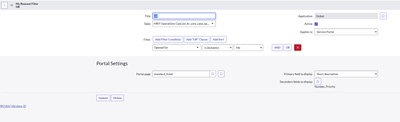
I have created a new record in the "My Requests" filter for the HR table. The setup includes configuring the title, table name, filter condition, and specifying the primary and secondary fields to display in the "My Requests" list. Additionally, you can use the "Portal Page" field to define the redirection behavior when a ticket is clicked, ensuring a seamless user experience.
The output for this :


Thanks and Regards
Sai Venkatesh
https://www.servicenow.com/community/now-platform-articles/customizing-the-quot-my-requests-quot-widget-in-service-portal/ta-p/3152920