
Broken Queries & Query Business Rules in ServiceNow
ACLs Vs. Business Rules for security?
Short answer: ACLs.
Longer answer: ACLs, but also sometimes query business rules; but usually for performance reasons more than security.
There are benefits to using Query Business Rules. Namely, performance benefits. This is because query Business Rules fire before ACLs run, which means that not only are you potentially returning fewer records, but you’re also eliminating whatever performance cost may have been associated with the ACLs themselves (which is a non-zero amount, especially if they’re script-heavy). That’s not to say that you should aim to go and replace all of your ACLs with query Business Rules, but there is definitely a case to be made for using both.
On the topic of security, though: one reason that I see people using query Business Rules is because they want to get rid of that “n records removed due to security constraints” message which shows up when ACLs block access to records in a list view. However, that message is often good! It makes troubleshooting really easy! Personally, I've never had a user complain about this or be confused by it, and it's really simple to explain if they do. The lack of such a message, when records are removed by "security" (using query business rules, which provide no such message) is what anyone trying to troubleshoot missing records could find confusing.
Note: There are some situations where that “n records removed by security…” message can leak information that you might otherwise want to keep secret. For example, I might search the HR case table for cases where I am the subject person, and someone I dislike is the reporter. Just knowing how many records match that query (for example, any number greater than zero) could be more information than I want a user to have!
There are a lot of reasons not to go completely replacing your ACLs with query Business Rules; not least of which is that query Business Rules are simply not meant to act as a security measure, can be overridden, and don't provide the security-oriented features that ACLs do.
But most importantly is that some query Business Rules can cause major issues in your query results! Not just filtering records without any indication they're doing so (and being difficult to troubleshoot at that), but also in terms of the actual query results that should be returned. This is more of an issue with the query-logic in ServiceNow (and more specifically, in SQL), but query Business Rules can make this issue a lot harder to troubleshoot if you aren’t aware of the awkward anti-logic that can ensue.
Imagine you have a table with the following records:
Shoes
| Number | Material | Description |
|---|---|---|
| 01 | Suede | Blue suede shoes |
| 02 | Leather | Leather loafers |
| 03 | Silk | Silk sandals |
| 04 | Barefoot | |
| 05 | Metal | Metal moccasins |
Most of the records have a value in the Material field, but Barefoot [04] doesn't. This is perfectly fine, as Material is not a required field.
Now, let's introduce a Query Business Rule that contains the code:
if (!gs.hasRole('admin')) { current.addQuery('material', '!=', 'Suede');
}
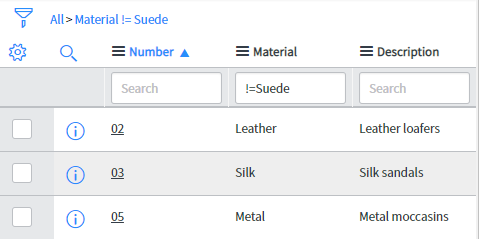
This query results in the following records being returned for anyone who isn't an admin:
| Number | Material | Description |
|---|---|---|
| 02 | Leather | Leather loafers |
| 03 | Silk | Silk Sandals |
| 05 | Metal | Metal moccasins |
Now, anyone who isn't an admin will not be able to see my Blue Suede Shoes in that table. -- But wait, what's this? Where is Barefoot [04]?
A blank string "" is not equal to the string "Suede"; not even loosely equal. If we're worried we're going insane, we can even test this by running the following line of code:
https://snprotips.com/blog/2018/9/18/broken-queries-and-query-rules