
How to Debug UI policy
 New article articles in ServiceNow Community
·
Jan 15, 2025
·
article
New article articles in ServiceNow Community
·
Jan 15, 2025
·
article
Hello,
You know how to debug Server-side scripting like Business Rule, Script include Script Actions etc.., using Script tracer, Script Debugger, Session log
I want to share you with you all how to debug UI policy ServiceNow using the below methods
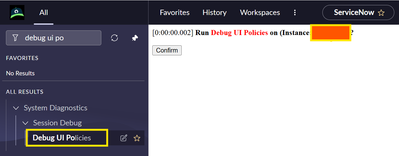
Navigate to the System Diagnostics > Session Debug > Debug UI Policies

Click on confirm button
UI Policies debugger will be activated

To open the JavaScript debug window use “ctrl+shift+i” or right click on the browser select “inspect”
Open a New/Existing incident record
I have created a UI Policy to make the description field mandatory and clear the value to true when subcategories were selected as antivirus
On the debug window you can see the below results

And, if we are using the UI 16 interface you can open the JavaScript log

Open a New/Existing incident record

To disable the Debug UI policy
Navigate to System Diagnostics > Session Debug > Disable UI Policies Debug

Click on Confirm button

Thank you,
Srikanth
https://www.servicenow.com/community/developer-blog/how-to-debug-ui-policy/ba-p/3150371