
Virtual Agent Architecture & Key Components
 New article articles in ServiceNow Community
·
Oct 30, 2024
·
article
New article articles in ServiceNow Community
·
Oct 30, 2024
·
article
Hi there,
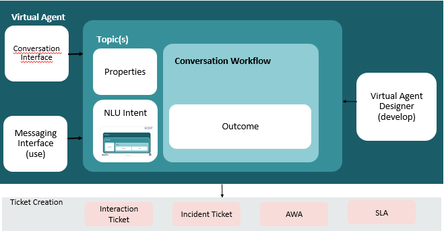
The ServiceNow virtual agent Bot serves as a primary channel for engaging customers and enhancing their overall experience. It is essential to comprehend its functionality, the architecture diagram, the components involved, and how to identify the business-relevant topics within the ServiceNow landscape. A deeper exploration into the components of the Virtual Agent Bot is warranted.
Based on my understanding and experience, I have formulated the following equation:
a. Bot + Topics + Portal Mapping = Virtual Agent
b. Virtual Agent + Gen AI = Now Assist

Before implementing these elements, it is important to familiarize oneself with the 'Conversational Interface' module. This module encompasses the Bot, UI modifications, Topic Designer, and other significant components.

The subsequent four fundamental components are essential for comprehending and constructing the virtual agent framework within the ServiceNow environment.
1. Creating a New Bot:
ServiceNow enables the creation of multiple Bots tailored to specific business needs. To develop a new Bot, please follow these steps:
Home Page > Left Navigation Pane > Conversational Interface > Home > Brand Virtual Agent > Branding > New > Enter a name for the new Custom Bot and make any necessary cosmetic adjustments.
2. Configuring the Created Bot for the Portal:
To add your Bot to a portal, navigate to
Conversational Interface > Home > Add your Bot to a portal.
3. Topic Recommendation:
Identify the necessary topic from the current business data within the system.
Navigate to Home Page > Access the Left Navigation Page > Enter 'Topic Recommendation' > Select Advanced Settings > Proceed to Intent Discovery > Execute Analysis > Input the required information, including table name and field for analysis > Execute Analysis > Determine the most pertinent topic from the business data. Publish the topic in the Bot and access through defined portal.
4. Virtual Agent Topics:
Initiate interaction with the requester and display the predetermined questions. Gather the information from the requester that pertains to the issue. Either offer a workaround or identify the root cause utilizing the available tickets.
Conversational Interface > Home > Create Bot Conversations > Access VA Designer > Develop the topic and define its behaviour.
servicenow #virtualagent #ConversationalInterface
Hope you like it. If any questions or remarks, let me know!
If this helped you in any way, I would appreciate it if you hit bookmark or mark it as helpful.
Regards,
Suresh.
https://www.servicenow.com/community/virtual-agent-nlu-articles/virtual-agent-architecture-amp-key-components/ta-p/3090980