
Data Filtration in Servicenow ? vs ACL | Step by Step Guide and its Advantages
Data Filtration in Servicenow ? vs ACL | Data Filtration v/s ALC what the difference ?
What's & Why's of Data Filtration ?
Access Control Lists (ACLs) are an important piece of the puzzle for ensuring data security and preventing access to those who should not have access to it.
It restricts access to data by requiring users to meet a set of criteria before interacting with it.
Every Access Control List rule specifies:
- The table/data being secured.
- The permissions/roles required to access the table/data.
However, ACLs can be a bit confusing at times, and we end up with a huge mess of hierarchical rules that are difficult to debug and can cause problems.
Fortunately, with the Tokyo release, ServiceNow has provided us with a new tool in our environment called Data Filtration that allows us to build out security rules more easily and quickly. Data Filtration simplifies certain requirements while also providing more granular access and security.
Steps on How to create Data Filtration in Servicenow :
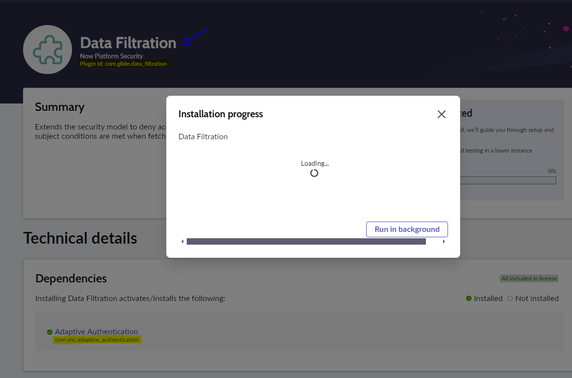
Step 1 : Install plugin > Plugin id: com.glide.data_filtration (Available on PDI too)

Step2 : Search for 'data filtration' from left navigation bar.

Here is what you get to see, lets understand them in some simple terms.
Types of Data Filtration in Servicenow :
- Data filtration records : Data Filtration Records deny access to table/records
- IP filter criteria : This allows you to filter IPs based on users IP Address. (config auth policy)
- Role filter criteria : This will allow to create filter criteria based on user roles.
- Group filter criteria : This will allow to create filter criteria based on user groups to which they belong.
- Subject criteria : This allows you to narrow down the filter based on IP,group,role, etc... (remember how you create user criteria for catalog items ? )
- Table exclusions : Used to exclude any table.
- Location & more...
Step3:
Before you get started, make sure you have security_admin role on your user account and elevate the roles.

Step 4 :
Click on 'Data filtration record' module and click on new.
Step 5:
Provide name : provide a name to data filter as per need.
Description :
Subject condition : (Users that do not satisfy the Security Attributes or the Subject Conditions will be denied access to records matching this Data Filter). Eg : Subject group is > Service desk. hence, here your defining a filter for a service desk group, we still have not defined any conditions here we have just define that that is going to be a data filtration happening based on 'service desk group'

Step 6: New , we need to define 'security attribute condition'.
So what does it mean ?
Well sometimes its important to mention or update this section, the "Security Attribute Condition" allows us to use other "ad hoc" (if local) or existing conditions, such as "Has Admin Role" or "Logged In" etc.... Click on the condition to explore more. You can also create your own scripted one.
For this example sake, ill ignore it....
Step 7:
Save the record, user preview button to review no of records matching your condition and filter.
Navigate to incident table and with assignment group field search for *desk or *service desk to see if there are any records shown with service desk group.

So this is how you use data filtration to deny access to records.
Benefits of using Data Filtration in servicenow :
- Data Filtration works in relation with ACLs in service-now, but they are executed BEFORE the ACLs are executed
- ACL works on 'grant’ principle and data filtration works on ‘deny’ principle. By configuring the rules, your instance denies access to records unless they meet the Data Filtration conditions.
- Data Filtration occurs ''After'' the ‘before-query’ business rules have been applied.
- Data Filtration supports session debugging to determine which Data Filtration records apply to a given query. Administrators can use this data to troubleshoot user access to records.
- Data filtration is low code solution and much more compatible with auditing needs.
If you find the article to be useful or effective for your knowledge Kindly Consider Marking the article HELPFUL and BOOKMARK if for your future use...
<<< Top Articles >>>

MF Sohail Khilji | Servicenow Developer / Consultant.
Connect On LinkedIn >https://www.linkedin.com/in/mf-sohail-khilji/
https://www.servicenow.com/community/developer-articles/data-filtration-in-servicenow-vs-acl-step-by-step-guide-and-its/ta-p/3022151