
Breakdown: Auto-population of Variables

Breakdown
Lets deep dive how this actually works, SN has introduced a new Resource in “Service Catalog API”.
Navigate here to see the complete list of available methods.
Service Catalog API: https://.service-now.com/sys_ws_definition.do?sys_id=b4558e83c3a302006f333b0ac3d3ae8e...
Search for “Get Dynamic Value” method or navigate here
https://<your_instance.service-now.com/sys_ws_operation.do?sys_id=f90b7b9febe011106fb3951ff1522873
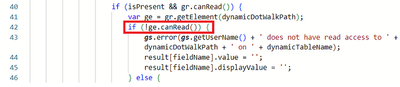
Within this method, pay attention to line 42, where dynamicDotWalkPath specifies the field to be dot-walked for value retrieval. This line is crucial for understanding how the system determines which field's value to fetch for auto-population.

it explicitly states that if the user does not have read access to the particular element or field, the value and displayValue attributes will not be populated and will remain empty.
Additionally, out-of-the-box (OOB) logs are generated to record instances where read access is restricted, providing a clear audit trail for access-related issues during auto-population.

This explanation outlines the overall workflow of the auto-population feature in ServiceNow and should help clarify how the process functions, including the access restrictions and their implications on the feature’s behavior.
Challenge: How do we utilize this feature without giving the read access to every other user on the target table.
I hope this issue has been flagged to ServiceNow’s attention, and that a resolution will be forthcoming, as granting read access to every user is not a viable option. I trust this article has provided you with new insights.
Happy learning!
https://www.servicenow.com/community/developer-blog/breakdown-auto-population-of-variables/ba-p/2988207