
What is the Impact Capabilities Map?
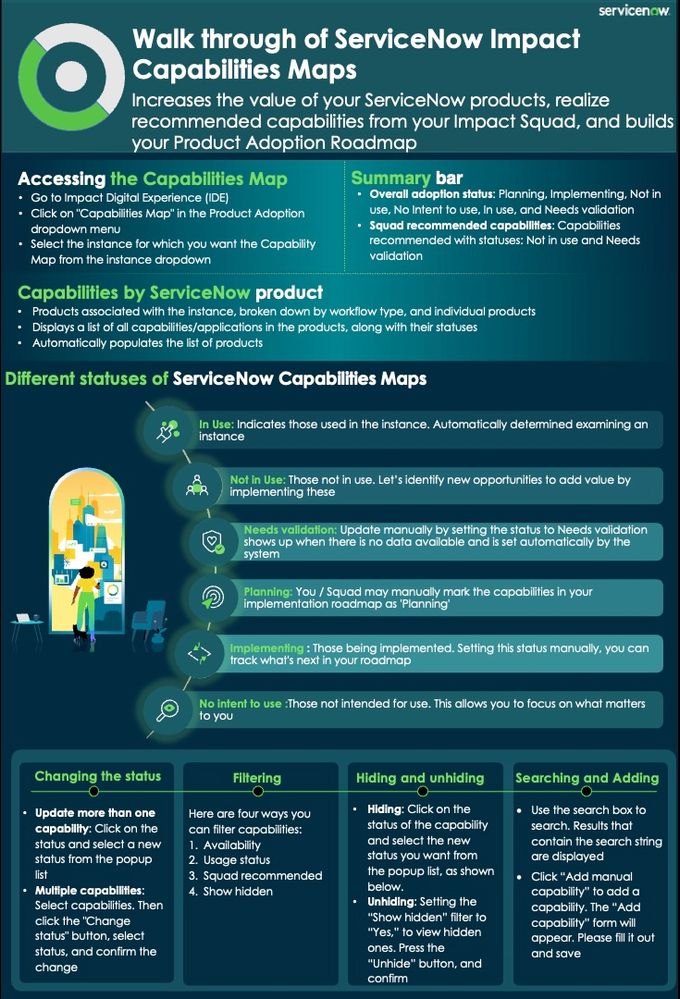
Every ServiceNow product comes with a set of high-value capabilities. For example, ServiceNow IT Service Management (ITSM) has many capabilities, including Incident Management, Change Management, Problem Management, and so on. As you implement more capabilities, you constantly increase the value you get out of your ServiceNow investment.
But how do you know exactly which ServiceNow capabilities you’re entitled to use? Which ones have you implemented already? How do you learn more about additional capabilities you’re not using yet? And how do you keep track of those you plan to implement?
That’s what the Impact Capability Map is all about. It gives you complete visibility of all the capabilities in the ServiceNow products you’ve licensed, and lets you see the status of each capability—whether you’re already using it, are planning to use it, are currently implementing it, or never intend to implement it at all. It also highlights the capabilities that your Impact Squad recommends and gives you instant access to detailed capability information so you can investigate further.
Let’s take a look at what the Capabilities Map gives you.
Note: In addition to the information in this blog, there’s also a detailed walk-through that takes you step-by-step through using the Capabilities Map.
See the capabilities of all your ServiceNow products at a glance
When you open up the Capabilities Map and select one of your instances, you’ll see a list of all the capabilities on that instance broken down by workflow type and product. For example, in the screenshot below, we’ve selected the ITSM product, which is categorized under Technology Workflows, along with other ServiceNow technology workflow products, such as ITAM and ITOM. Only the ServiceNow products that appear are the ones that are licensed on that instance.

You can now see all of the capabilities that come with ITSM, along with their status. For example, Contract Management is currently “In use” while Coaching is “Not in use”. Wherever possible, the Impact IDE automatically determines whether a capability is in use or not by examining the instance. You can also easily change the status of any capability — for instance, we’ve manually set the Change Management capability status to “Implementing” to show it’s currently being implemented. Other statuses you can set include “Planning” and “No intent to use”. This means you can keep track of all capabilities that come with ITSM and where they are in their adoption lifecycle.
You can also filter this list using the filters at the top of the Capability Map to zoom in on exactly what you want to see. For example, you can show just those capabilities that you’re currently implementing, or just those that are recommended by your Impact Squad. You can also hide capabilities you’re not interested in, which will remain hidden unless you unhide them.
Finding out more about a capability
Let’s assume you want to learn more about a capability you’re not currently using. Simply click on the capability, and a flyout will appear with more information about that capability—including a description and links to product documentation. If the capability is one that your Impact Squad has recommended, you’ll also see links to additional useful resources. For example, in the screenshot below, we’ve accessed more information about the “Performance Analytics for Service Management” capability that comes with ITSM.

You can also make notes about the capability in the flyout by clicking on the “Notes” tab. This is a great way to capture your thoughts about the capability. For example, is it something that would help you to solve a problem? Notes are also a great way to share information with your Impact Squad since they can see and respond to your notes. In fact, they can see everything in the Capability Map, so—for instance—they can see if you have no intention to implement a particular capability and take this into account when providing recommendations.
Adding your own capabilities
The Capabilities Map gives you a comprehensive list of capabilities for all ServiceNow products you’ve licensed on an instance. However, you can also add your own capabilities to create a complete record of what’s on the instance. For example, if you’ve built — or are planning to build — a custom app, you can easily add this to the map. Just click on “Add manual capability”, fill in the form as shown below with the capability details, and save it.
You can now manage this capability just like any other capability.

Ready to unlock the full potential of your ServiceNow investment? Start utilizing the Impact Capability Map today to gain complete visibility and control over your licensed capabilities. Track your implementation status, explore new features, and manage your custom capabilities—all in one place.

https://www.servicenow.com/community/servicenow-impact-articles/what-is-the-impact-capabilities-map/ta-p/2987952